Remote Job Scam Warning Signs: 5 Red Flags Before You Apply
Don't get fooled by 'too good to be true' offers. Learn how to spot remote job scams before they steal your data.
7 months ago - Updated 3 months ago

The dream of working from home—sipping coffee in your pajamas, skipping the soul-crushing commute, and reclaiming hours of your day—has become a reality for millions. However, this shift in the global workforce has birthed a darker parallel industry: the rise of sophisticated job scams. As the demand for flexibility grows, so does the ingenuity of fraudsters looking to exploit hopeful job seekers.
According to the Federal Trade Commission (FTC), Americans lost record amounts to employment scams in recent years, with remote work being the primary bait. These aren't just "get rich quick" schemes anymore; they are highly choreographed deceptions that mimic legitimate corporate hiring processes. To navigate the modern job market safely, you need more than just a polished resume—you need a high-powered "scam radar." Utilizing a comprehensive job search platform like CareerBoom.ai can help you maintain a centralized, secure record of your applications, making it easier to spot inconsistencies in the hiring process.
This comprehensive guide breaks down the five major red flags of WFH fraud and provides essential job search tips to ensure your next career move is a step forward, not a costly mistake. It is also helpful to review other remote job red flags to stay one step ahead of bad actors.
The Evolving Landscape of Remote Work Fraud
Before we dive into the specific red flags, it is crucial to understand why job scams have become so prevalent. In a traditional office setting, you physically visit a building, meet people in person, and see the infrastructure. Remote work removes these physical anchors, allowing scammers to hide behind professional-looking websites and spoofed email addresses.
Scammers often target specific demographics:
- Entry-level seekers: Who may not be familiar with standard corporate onboarding and might need to learn how to write a resume with no experience.
- Career changers: Who are navigating unfamiliar industries.
- Parents and caregivers: Who are desperate for the flexibility that remote work provides.
By understanding the psychology of these traps, you can better implement remote work safety protocols in your daily search and learn how to spot and avoid remote job scams before they impact your finances.
Red Flag #1: The Interview Process is Conducted Entirely via Messaging Apps
In the professional world, the interview is a two-way street designed for both parties to vet each other. Legitimate companies investing in remote talent want to see your face, hear your voice, and assess your cultural fit. If a "hiring manager" insists on conducting the entire recruitment process—from initial contact to the final offer—via a text-based messaging app, you are likely looking at a scam.
The Messaging App Trap
Scammers favor apps like Telegram, WhatsApp, Signal, or even Skype’s chat-only feature. Why? Because these platforms offer end-to-end encryption and allow users to remain anonymous or easily delete entire conversations once the scam is complete.
Why this is a red flag:
- Lack of Verification: It is impossible to verify the identity of the person on the other end of a text bubble.
- Automation: Scammers often use scripts or AI bots to handle dozens of "interviews" simultaneously.
- Speed over Substance: These text interviews are often incredibly brief, lasting only 15–30 minutes before an "offer" is extended.
What a Legitimate Process Looks Like
A real remote company will typically follow this sequence:
- Email Invitation: From a corporate domain (e.g., name@company.com).
- Screening Call: A brief phone call with a recruiter.
- Video Interviews: At least one, but usually multiple, rounds via Zoom, Microsoft Teams, or Google Meet. Knowing how to ace a Zoom interview is a vital skill for any legitimate remote role.
- Identity Verification: Seeing a live human being who can answer specific questions about the company’s culture and operations.
Pro Tip: If an employer says they "don't do video interviews for security reasons," walk away immediately. Real companies prioritize security by verifying who they hire, not by hiding. You can prepare for real encounters by following a remote job interview day checklist.
Red Flag #2: You Are Asked to Pay for Equipment or "Training" Upfront
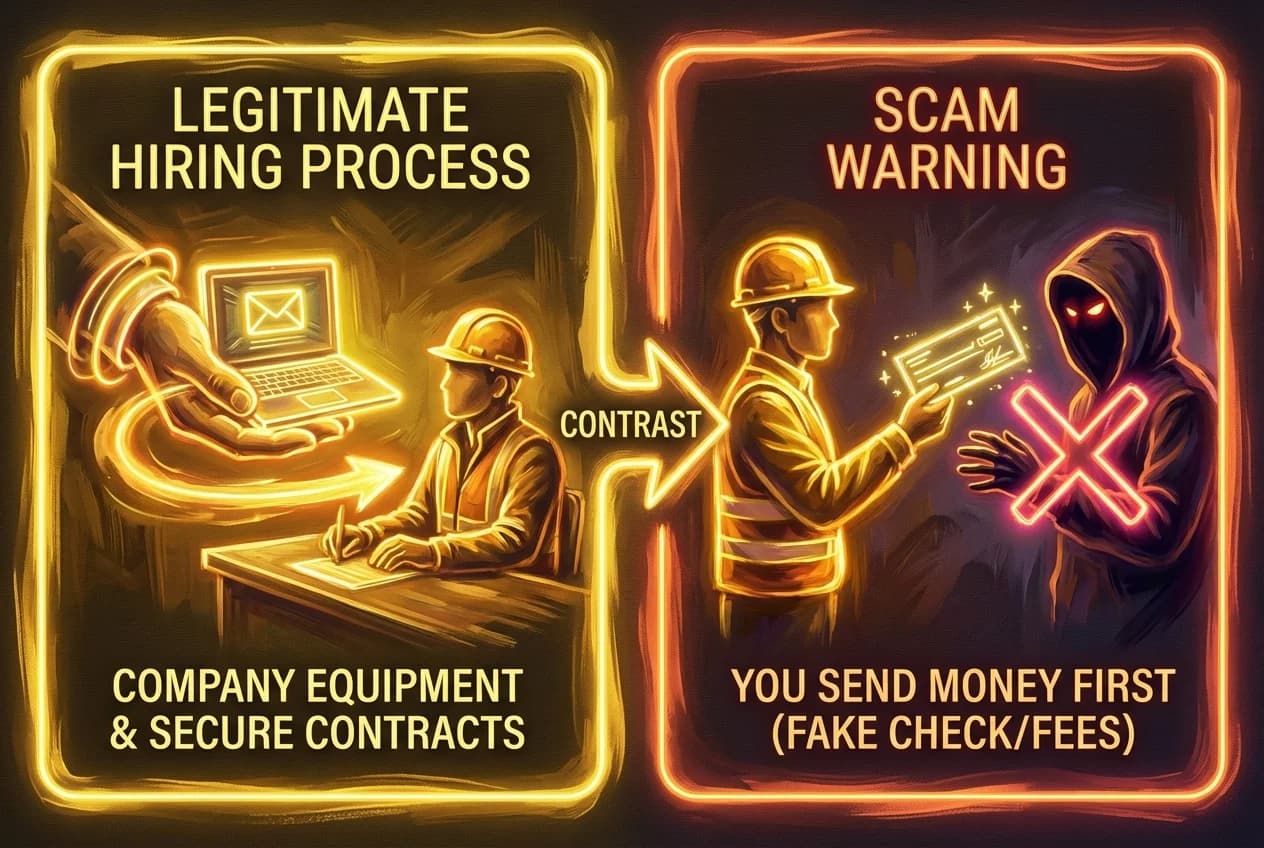
This is perhaps the most financially devastating of all job scams. A legitimate employer will never ask you to send them money to start a job. In most jurisdictions, the employer is responsible for providing the tools necessary for you to perform your duties, or they will provide a stipend after you have been officially onboarded.
The "Check Scam" Explained
This is a sophisticated form of WFH fraud that catches many off guard. Here is how it usually plays out:
- The Offer: You are "hired" and told the company will provide a home office setup (laptop, printer, specialized software).
- The Check: They send you a digital or physical check for a large sum (e.g., $3,000).
- The Instruction: You are told to deposit the check and use the funds to buy equipment from a "certified vendor" or "authorized supplier."
- The Catch: The "vendor" is actually the scammer. You send the money via Zelle, Venmo, or wire transfer.
- The Fallout: A few days later, your bank realizes the original check was fraudulent. The bank reverses the deposit, and you are out the $3,000 of your own money that you sent to the "vendor."
Other Financial Red Flags
| Scam Type | Description | The Hook |
|---|---|---|
| Training Fees | You must pay for a mandatory "certification" course before starting. | "We need to ensure you're qualified." |
| Software Fees | You are asked to pay for a proprietary software license. | "This is a one-time setup fee." |
| Home Office "Insurance" | You are asked to pay for insurance on the equipment they are sending. | "This protects our assets during shipping." |
The Golden Rule of Remote Work Safety: If you have to pay to get the job, it isn't a job—it's a scam.
Red Flag #3: The Salary is Way Above Market Average for the Required Skills
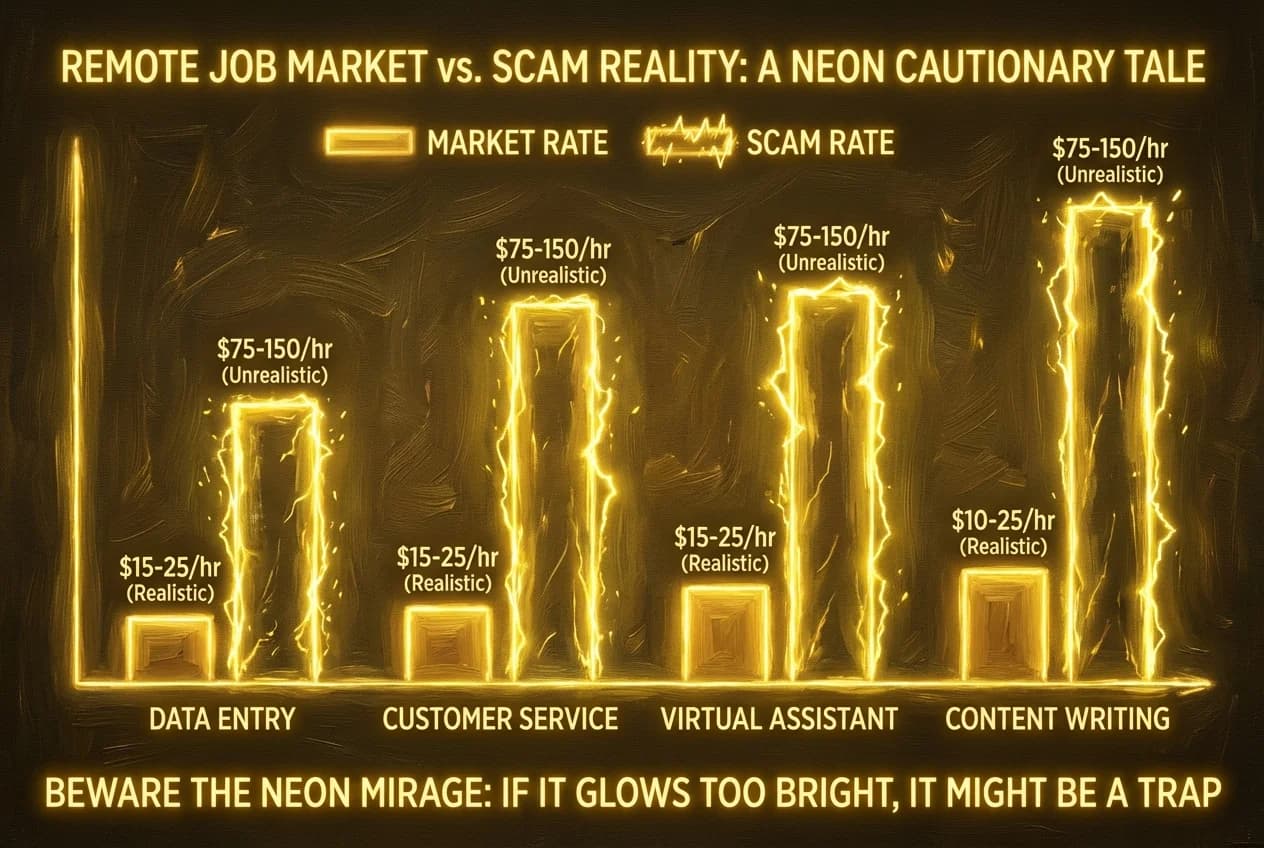
We all want to be paid what we’re worth, but scammers use "too good to be true" salaries to blind job seekers to other red flags. This is a classic "bait and switch" tactic used in job scams. Understanding salary negotiation secrets can help you recognize when an offer is genuinely competitive versus when it is a trap.
Spotting Unrealistic Compensation
If you see a posting for a "Remote Data Entry Clerk" or "Virtual Administrative Assistant" offering $45–$60 per hour with "no experience required," alarm bells should go off. While there are legitimate high-paying remote jobs that don't require a degree, they still follow the basic laws of economics and market rates.
Common "Bait" Salaries:
- Data Entry: Market rate is typically $15–$22/hr. Scammers offer $40+/hr.
- Customer Service: Market rate is $16–$25/hr. Scammers offer $50+/hr.
- Package Reshipping: Often disguised as "Quality Control Manager," offering thousands a month for just a few hours of work. (Note: Reshipping is almost always a front for moving stolen goods).
How to Verify Market Rates
Before applying, use these job search tips to benchmark the salary:
- Glassdoor & Payscale: Check the average salary for that specific role in the company's headquarters city.
- Bureau of Labor Statistics (BLS): Look up the median pay for the job category.
- LinkedIn Salary: See what similar roles are actually paying in the current market.
If the offer is significantly higher than the 90th percentile for that role, ask yourself: Why would a company pay double the market rate for a job that thousands of people are qualified to do? The answer is almost always that the job doesn't exist.
Red Flag #4: Vague Job Descriptions and Non-Professional Communication
Legitimate companies spend a significant amount of time and money on their branding and recruitment materials. They want to attract the best talent, which requires clear, concise, and professional communication. Scammers, often operating from overseas or at high volumes, frequently cut corners.
The Anatomy of a Scam Job Description
A fake job description is often intentionally vague so that it can apply to as many people as possible. Look out for:
- Generic Requirements: "Must be able to use a computer," "Must have a positive attitude," or "Must be 18+."
- Lack of Specific Tasks: It doesn't explain what you will actually be doing day-to-day.
- Over-emphasis on Benefits: The post spends more time talking about "flexible hours" and "working from your bed" than it does about the actual job responsibilities. Professional candidates often focus on tailoring your cover letter for fully remote companies to show they understand specific company values, which scammers rarely mention. By using CareerBoom.ai to intelligently align your resume with real-world job descriptions, you can ensure your application stands out to legitimate recruiters while avoiding the generic traps set by fraudsters.
Communication Red Flags
Pay close attention to the emails and messages you receive:
- The Domain Name: Does the email come from
hr@apple-jobs-careers.cominstead of@apple.com? Scammers often buy domains that look almost right. - Poor Grammar and Syntax: While not every recruiter is a Pulitzer Prize winner, professional emails shouldn't be riddled with basic spelling errors, odd capitalization, or "kindly" (a common linguistic marker in international scams).
- Urgency: Scammers create a false sense of urgency. "You must accept this offer within 2 hours or it will be given to someone else." They don't want you to have time to think or do your research.
Red Flag #5: Requests for Sensitive Personal Information Early in the Process
Data is the new gold, and job scams are often just elaborate front-ends for identity theft. In a legitimate hiring process, you will eventually have to provide sensitive information, but only after a formal offer has been signed and you are beginning the official onboarding process via a secure HR portal (like Workday, Rippling, or Gusto).
What Scammers Want
If a recruiter asks for any of the following during the application or interview stage, stop communicating:
- Social Security Number (SSN): They may claim they need it for a "background check" before the interview.
- Bank Account Details: They may say they need it to "set up direct deposit" before you’ve even seen a contract.
- Copy of your ID/Passport: "To verify your right to work" before they've even met you.
- Credit Score: Some scams redirect you to a fake site to "check your credit" as a requirement for the job, stealing your login credentials in the process.
How to Verify a Company’s Legitimacy
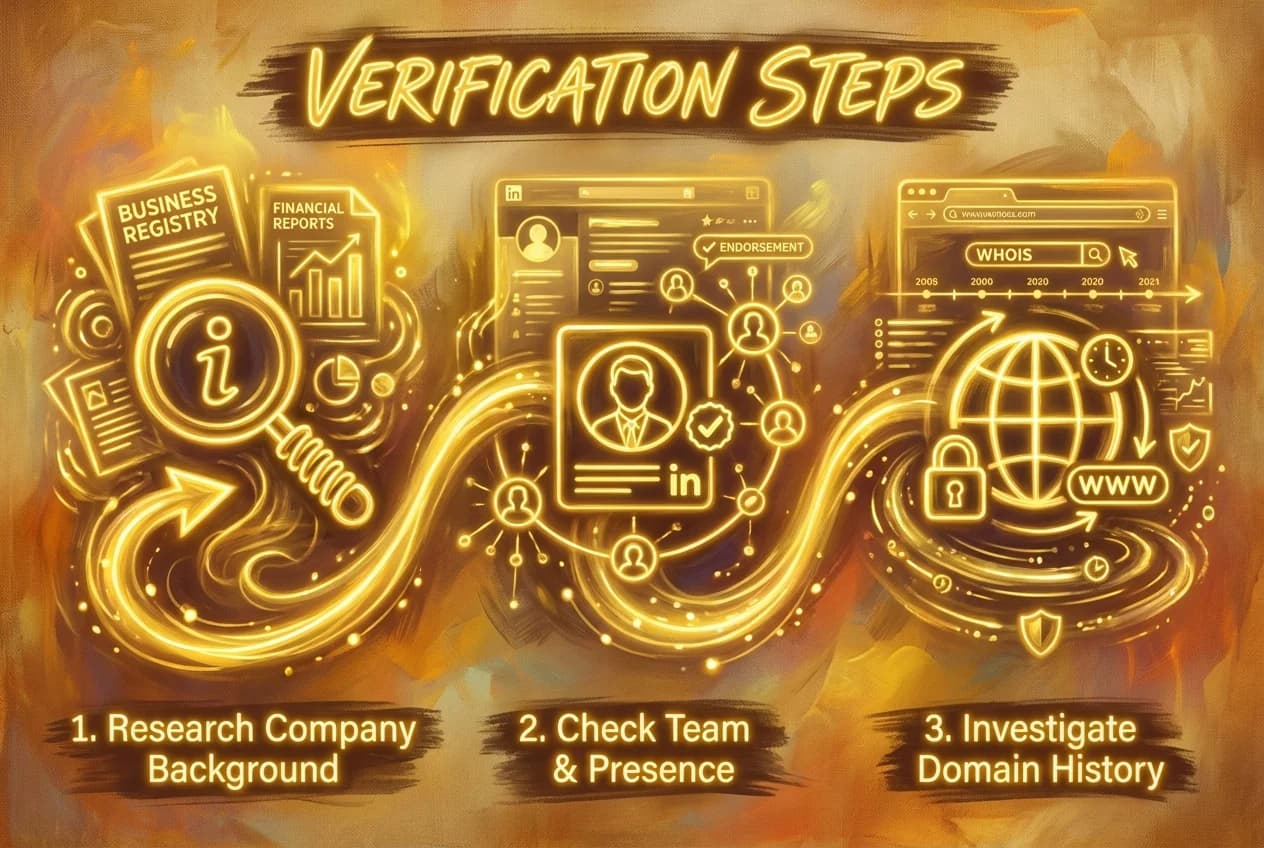
If you encounter a job post that seems "borderline," don't leave it to chance. Use these proactive job search tips to verify the employer:
1. The "Whois" Lookup
If the company’s website looks a bit "thin," go to Whois.com and type in their domain name.
- Red Flag: The website was created only a few weeks or months ago.
- Red Flag: The registrant information is hidden or located in a country that doesn't match the company's headquarters.
2. LinkedIn Cross-Referencing
Search for the person who contacted you on LinkedIn.
- Do they actually work for the company?
- Do they have a legitimate profile with connections, endorsements, and a history? Using LinkedIn tips and tricks can help you better navigate the platform to verify professional identities.
- Note: Be careful—scammers sometimes create fake profiles using photos of real people. Look for a "Verified" badge or a significant number of mutual connections in your industry.
3. The Better Business Bureau (BBB) and Google Maps
Search the company name on the BBB website to see if there are any reported scams. Additionally, look up their physical address on Google Maps. If the "corporate headquarters" of a global tech firm is a residential house or a P.O. box, be wary.
4. Direct Outreach
If you’re unsure if a job posting on a site like Indeed or LinkedIn is real, go directly to the company’s official website. Look for a "Careers" or "Join Us" page. If the job isn't listed there, the third-party posting might be a scam. You can also consult a list of the best remote jobs websites or top job search sites in the USA to find verified openings.
Common Remote Job Scam Archetypes
To help you visualize these threats, here are the three most common "characters" in the world of WFH fraud:
The "Virtual Personal Assistant"
The scammer claims to be a busy executive (often traveling abroad) who needs someone to handle basic tasks like scheduling, travel arrangements, and "paying bills." They send you a check to "distribute" to various charities or vendors. This is almost always a money-laundering or check-cashing scam.
The "Data Entry Specialist"
This is the most common bait for job scams. It promises high pay for simple typing. The goal is usually to get you to pay for "training software" or to harvest your personal data for identity theft.
The "Package Optimization Manager"
Also known as "Reshipping Fraud." You are told your job is to receive packages at your home, inspect them, and then ship them to another address (often overseas). In reality, these packages contain items bought with stolen credit cards. You are acting as a "mule," and when the police track the stolen goods, they lead straight to your front door.
What to Do if You’ve Been Scammed
If you realize you’ve fallen victim to a scam, don't let embarrassment stop you from taking action. Speed is of the essence to minimize the damage.
- Contact Your Bank Immediately: If you deposited a check or sent money, call your bank’s fraud department. They may be able to freeze the transaction or your account to prevent further loss.
- Freeze Your Credit: If you gave out your SSN, contact the three major credit bureaus (Equifax, Experian, and TransUnion) to place a credit freeze. This prevents scammers from opening new accounts in your name.
- Report to the Authorities:
- FTC: Report at ReportFraud.ftc.gov.
- IC3: The FBI’s Internet Crime Complaint Center at ic3.gov.
- The Job Board: Report the posting to LinkedIn, Indeed, or wherever you found it so they can take it down and protect others.
- Change Your Passwords: If you clicked on any suspicious links or provided login info, change your passwords for all major accounts (email, banking, social media) and enable Two-Factor Authentication (2FA).
Final Thoughts: Staying Safe in the Remote Era
The shift toward remote work is a net positive for the global workforce, offering unprecedented freedom and opportunity. However, that freedom comes with the responsibility of digital literacy. By recognizing these five red flags—messaging-app interviews, upfront costs, unrealistic salaries, unprofessionalism, and premature data requests—you can protect yourself from the devastating effects of job scams.
Remember: A legitimate employer is looking for your skills and experience, not your bank account balance or your ability to move packages. Trust your gut. If a situation feels "off," it probably is. Stay vigilant, do your research, and prioritize your remote work safety above all else.
The right remote job is out there—one that values your time, respects your privacy, and pays you a fair wage for your hard work. By following these job search tips and utilizing a comprehensive career platform like CareerBoom.ai to manage your applications, you’ll be well on your way to finding it safely.
Frequently Asked Questions
Quick answers to common questions
Look for red flags like interviews held only on messaging apps (Telegram/WhatsApp), requests for upfront payment for equipment, or salaries that are significantly above market average. Always verify that the sender's email domain matches the official company website exactly.
No. This is a common "check scam." Legitimate companies will either:
- Ship pre-configured equipment directly to you.
- Provide a stipend after you are officially onboarded. Never deposit a check and send money back to a "certified vendor" or supplier.
Scammers prefer these apps because they offer encryption and anonymity, making it easy to delete evidence and disappear once the fraud is complete. Real companies use professional video tools like Zoom, Microsoft Teams, or Google Meet to verify your identity and assess fit.
If you've shared sensitive data, take these steps immediately:
- Freeze your credit with Equifax, Experian, and TransUnion.
- Report the identity theft at IdentityTheft.gov.
- Change passwords for your primary email and banking accounts.
- Monitor your financial statements for unauthorized activity.
Usually, no. If a "No Experience" data entry role offers $40–$60 per hour, it is likely WFH fraud. Standard market rates for these roles typically range from $15–$22 per hour. If the compensation seems too good to be true, it is likely a bait-and-switch tactic.
Use these job search tips to stay safe:
- Check the "Careers" page on the official corporate website.
- Lookup the domain on Whois.com to see if the site was recently created.
- Research the recruiter on LinkedIn to confirm their employment history and connections.
This is a reshipping scam where you act as a "mule" for stolen goods. Legitimate companies do not hire people to receive and forward packages from their homes. Engaging in this can lead to legal trouble, as you are handling items purchased with stolen credit cards.
Was this article helpful?
Table of Contents
The Evolving Landscape of Remote Work Fraud
Red Flag #1: The Interview Process is Conducted Entirely via Messaging Apps
Red Flag #2: You Are Asked to Pay for Equipment or "Training" Upfront
Red Flag #3: The Salary is Way Above Market Average for the Required Skills
Red Flag #4: Vague Job Descriptions and Non-Professional Communication
Red Flag #5: Requests for Sensitive Personal Information Early in the Process
How to Verify a Company’s Legitimacy
Common Remote Job Scam Archetypes
What to Do if You’ve Been Scammed
Final Thoughts: Staying Safe in the Remote Era
1How can I tell if a remote job offer is a scam?
2Is it normal for a remote employer to send a check for equipment?
3Why do scammers use Telegram or WhatsApp for job interviews?
4What should I do if I gave my Social Security number to a job scammer?
5Are high-paying remote data entry jobs legitimate?
6How can I verify if a remote company is real?
7What is a "package optimization" or reshipping job?
Share this article
Other articles

21 Best Remote Job Sites in 2026 (Verified Platforms)
Discover verified platforms from CareerBoom.AI to LinkedIn for landing high-paying remote careers.
How to Ace a Zoom Interview: Setup, Lighting, and Etiquette
Master the art of virtual interviews with expert tips on technical setup, lighting, background, and professional etiquette.
7 Essential Skills to Showcase on Your Fully Remote Job Resume to Get Hired
Discover the top 7 crucial skills to highlight on your resume to secure your dream work-from-home position.