The ONLY Resume Format That Gets You Interviews, Guaranteed
Stop guessing! Learn the scientifically proven resume format that consistently lands interviews and impresses hiring managers.
8 months ago - Updated 3 months ago

For many job seekers, the resume feels like a lottery ticket. You send it out, hope for the best, and too often, hear nothing back. It’s a frustrating cycle that leaves countless talented professionals wondering what they’re doing wrong. The truth is, it’s rarely about your qualifications and almost always about how they’re presented. In a competitive job market, your resume isn't just a document; it's your marketing brochure, your first impression, and your golden ticket to an interview. If it doesn't immediately grab attention, it gets lost in the digital abyss.
Stop guessing! It's time to unlock the secret to more interviews and impress hiring managers consistently. This article will reveal the single most effective resume format that recruiters prefer and that guarantees your application gets the attention it deserves. It's simpler than you think, and it's the only resume format you'll ever need to know.
The Resume Gauntlet: Why Most Resumes Fail
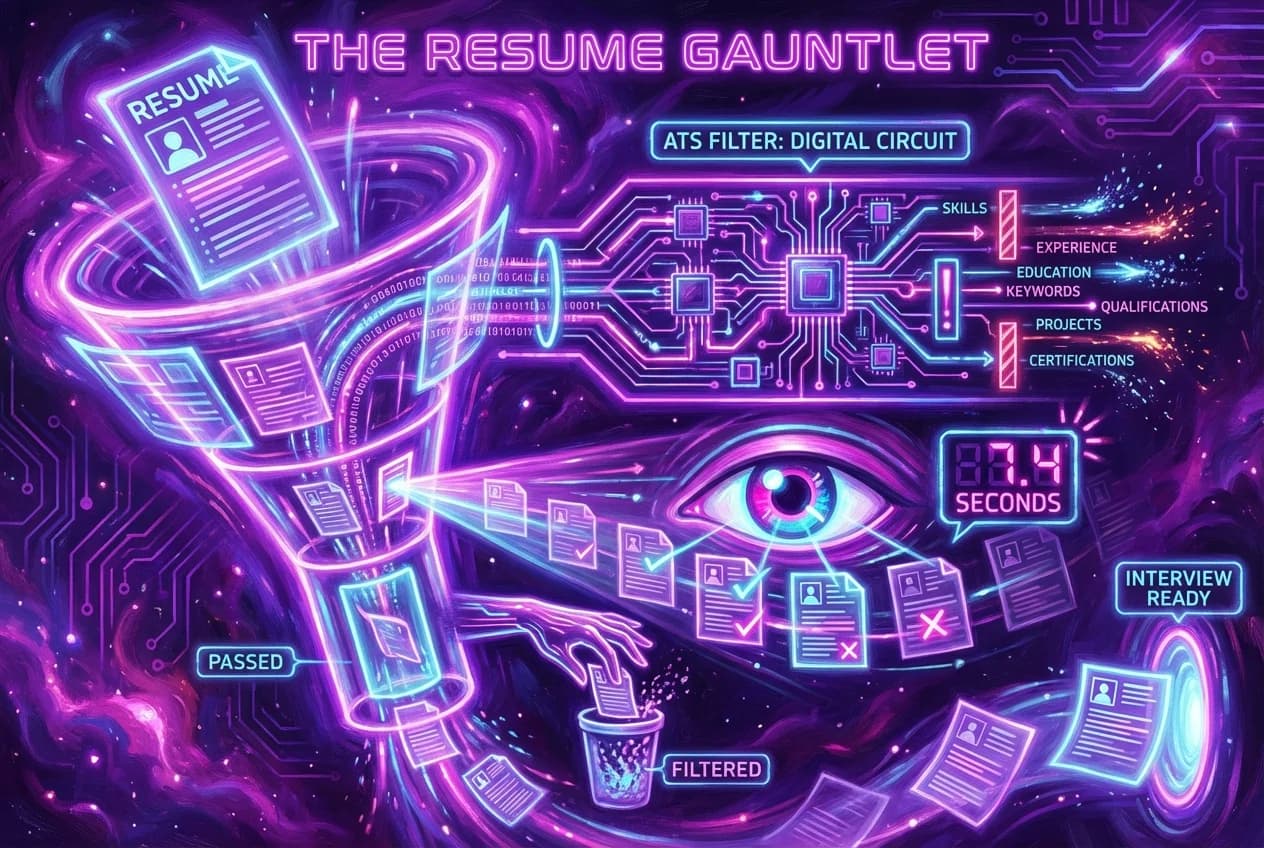
Before we dive into the solution, let's understand the problem. The modern hiring landscape is a gauntlet. Your resume first faces an Applicant Tracking System (ATS), a software program designed to filter out unqualified candidates. Only about 25% of applications make it past the ATS to a human recruiter. Recruiters, in turn, spend mere seconds – an average of 7.4 seconds, to be precise – on their initial scan of a resume. This means your resume has to be optimized for both machines and humans, or it risks being discarded before your skills and experience even get a fair look.
Many job seekers make critical mistakes that prevent their resumes from passing these initial hurdles:
- Poor Formatting: Cluttered layouts, unconventional fonts, or graphics can confuse ATS software and make it difficult for human eyes to quickly extract information.
- Lack of Keywords: Not using the specific terms from the job description can cause an ATS to deem your resume irrelevant, regardless of your qualifications.
- Generic Content: A one-size-fits-all resume fails to demonstrate how your unique skills and experiences align with the specific job requirements, failing to capture human interest.
- Unquantified Achievements: Simply listing responsibilities without showcasing measurable accomplishments doesn't prove your impact or value.
If your resume isn't strategically designed, it's not just being overlooked; it's being actively filtered out.
Revealing the "ONLY" Format: The Strategic Reverse-Chronological Resume
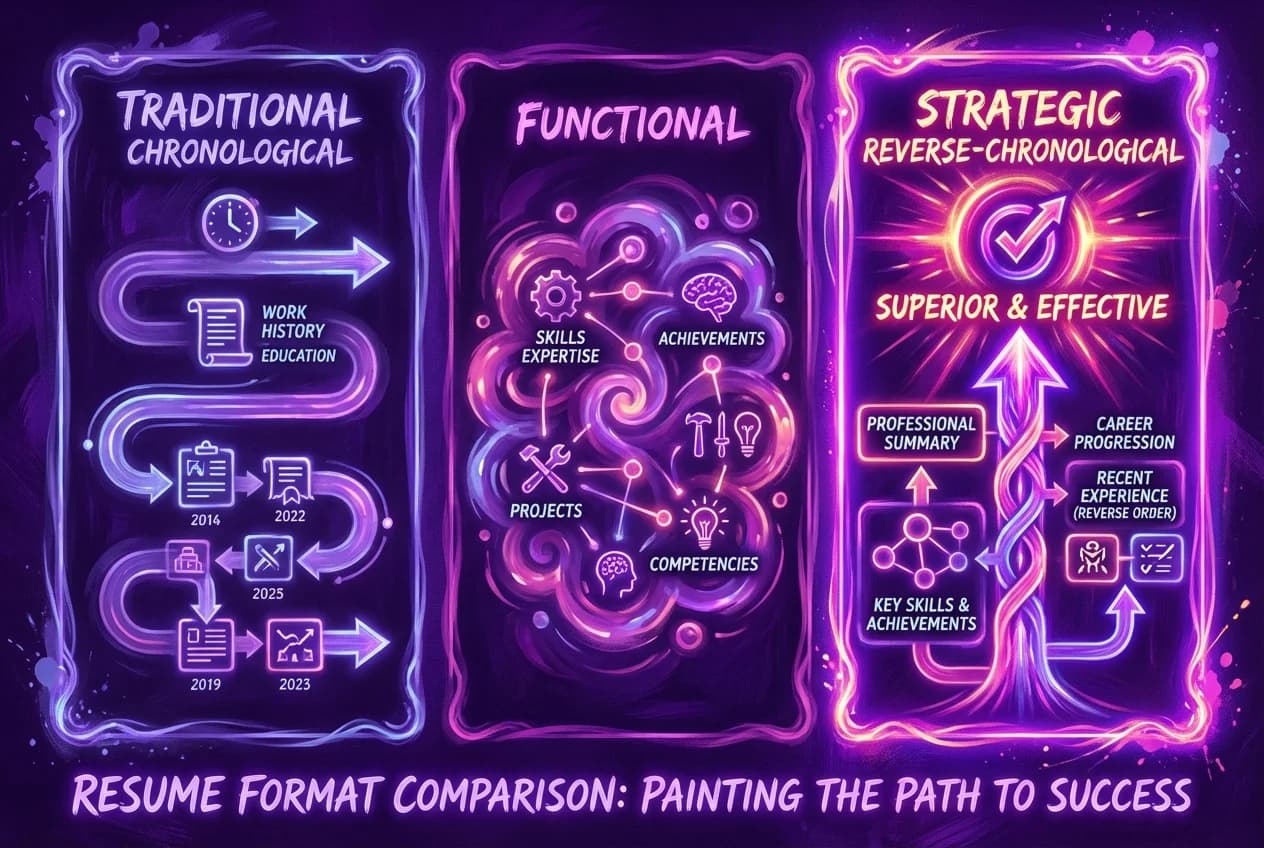
After extensive research into what recruiters and Applicant Tracking Systems (ATS) consistently favor, one format emerges as the undisputed champion: the Strategic Reverse-Chronological Resume.
While the "chronological resume" (often referred to interchangeably with reverse-chronological) is the most common and traditional resume format, a "strict" chronological resume that merely lists work history is rarely recommended anymore. The "Strategic Reverse-Chronological Resume" takes the best elements of the traditional chronological approach and enhances it with the strategic, skill-focused introduction typically found in a "combination resume." This hybrid approach is what truly sets candidates apart.
Why It Works: Debunking Other Formats
To understand the power of the Strategic Reverse-Chronological Resume, let's briefly look at other common resume formats:
- Chronological Resume (Traditional): This format lists your work experience in reverse chronological order, starting with your most recent position. It's excellent for showcasing career progression and stability. However, a purely chronological resume without a strong summary can sometimes bury key skills if they're not immediately apparent in your most recent job titles.
- Functional Resume: This format emphasizes your skills and abilities over your work history, grouping experiences by competency rather than by employer or date. While useful for career changers, recent graduates, or those with significant employment gaps, it is generally not preferred by recruiters. Recruiters often find functional resumes hard to read and comprehend because they lack a clear timeline of career progression and can raise skepticism about hidden employment gaps.
- Combination Resume: Also known as a hybrid resume, this format attempts to balance skills and experience with employment history. It typically starts with a robust skills or summary section and then follows with a reverse-chronological work history. This is the closest to our "Strategic Reverse-Chronological Resume" and is often cited as the "best resume format" for its balanced approach.
The Strategic Reverse-Chronological Resume combines the clarity and familiarity of the reverse-chronological structure (which recruiters and ATS are trained to look for) with a powerful, keyword-rich professional summary that immediately highlights your most relevant skills and achievements. It provides a clear timeline of your career progression while ensuring your most valuable qualifications are presented upfront, making it both ATS-friendly and highly scannable for human eyes.
Deconstructing the Strategic Reverse-Chronological Resume
This format is structured to maximize impact and readability. Here's a breakdown of its essential sections, in order:
1. Contact Information
This is your professional header, making it easy for recruiters to reach you.
2. Professional Summary or Objective Statement
This is arguably the most critical section for getting past the initial scan. It's a brief, powerful paragraph (or bulleted list for an objective) that acts as an elevator pitch for your career.
3. Skills Section
A dedicated section to list your core competencies, both hard and soft skills, optimized for ATS.
4. Work Experience
This is the heart of your resume, detailing your professional history in reverse-chronological order. Each role should include quantifiable achievements.
5. Education
Your academic background, also listed in reverse-chronological order.
6. Optional Sections
Depending on your career stage and the job, you might include sections for projects, certifications, volunteer work, awards, or publications.
Now, let's delve into why this "resume layout" is scientifically proven to work and how to craft each section for maximum impact.
The Science Behind Its Success: Why This Format Gets You Interviews
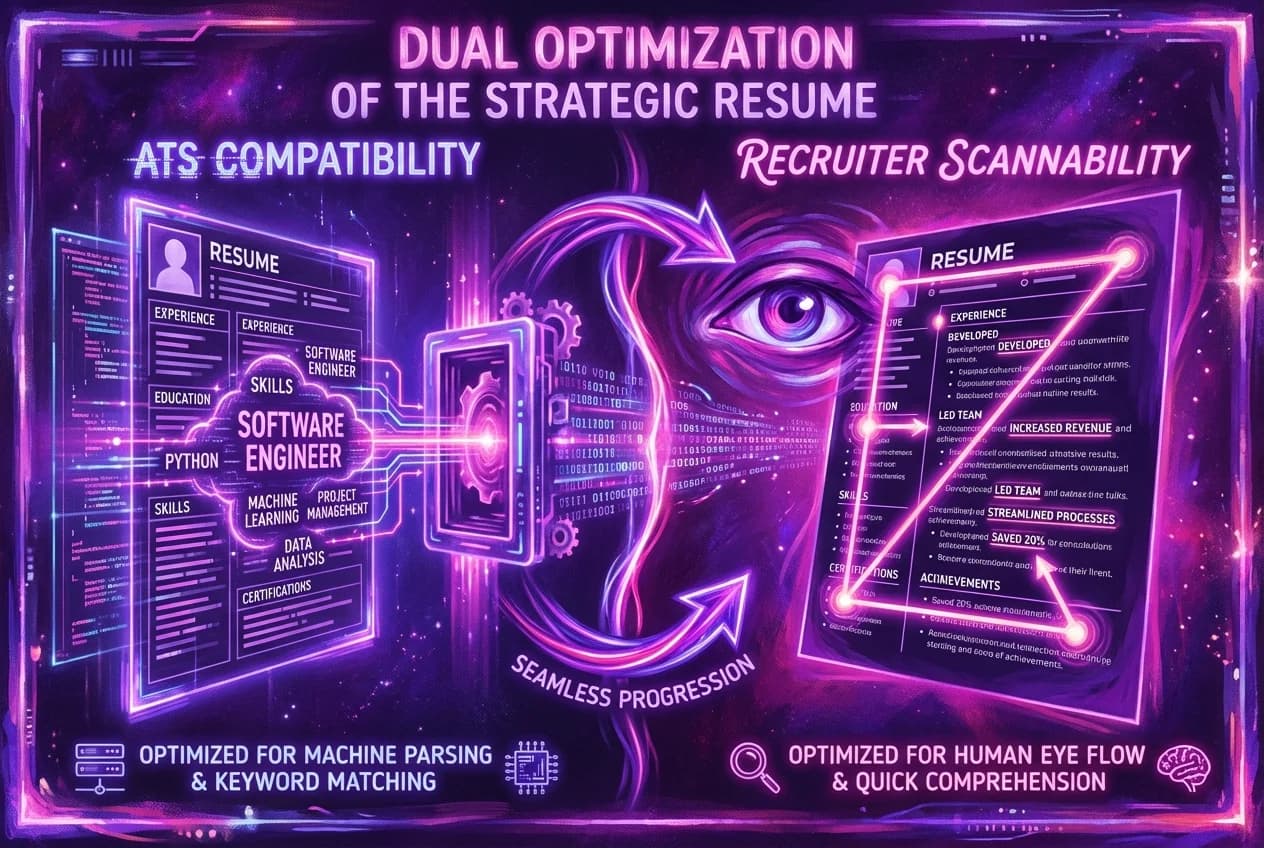
The Strategic Reverse-Chronological Resume isn't just a suggestion; its effectiveness is rooted in how recruiters and technology process information.
1. ATS Compatibility
Applicant Tracking Systems are the first gatekeepers. They scan resumes for keywords, standard section headings, and a clean format.
- Keyword Optimization: ATS software matches keywords from the job description to your resume. The Strategic Reverse-Chronological format, with its dedicated summary and skills sections, allows for natural and prominent integration of these keywords.
- Standard Headings: Using clear, standard section headings like "Professional Summary," "Skills," "Work Experience," and "Education" ensures the ATS can correctly parse your information. Avoid creative or unusual headings that might confuse the system.
- Clean, Simple Design: ATS systems struggle with complex layouts, tables, graphics, text boxes, and images. A clean, single-column layout with standard fonts and minimal embellishments is highly ATS-friendly.
- File Type: Always save your resume as a PDF unless the application specifically requests a Word document. PDF preserves your formatting across different systems.
2. Recruiter Scannability
Once past the ATS, your resume lands in front of a human recruiter who has limited time. They are looking for specific information quickly.
- F-Pattern and Z-Pattern Reading: Recruiters often scan resumes in an F-pattern (reading across the top, down the left side, then across again) or Z-pattern. The Strategic Reverse-Chronological layout places crucial information (summary, most recent experience) in these prime viewing areas.
- Clear Visual Hierarchy: Good "resume design" uses white space, consistent formatting, and strategic bolding to guide the eye. Recruiters should be able to quickly locate key areas like work experience and education.
- Bullet Points: Dense blocks of text are a recruiter's nightmare. Bullet points break down complex information into digestible chunks, highlighting key achievements.
- Conciseness: A one-page resume is ideal for most candidates, especially those with under 10 years of experience. For more experienced professionals, two pages are acceptable, but every word must count.
3. Highlighting Relevance and Career Progression
This format naturally showcases your most relevant and recent experiences first, demonstrating a logical career path and consistent growth.
- Recent Experience First: Employers are most interested in what you've done lately. Listing your most recent roles at the top immediately shows your current skill set and responsibilities.
- Demonstrating Growth: The reverse-chronological order clearly illustrates how you've advanced, taken on more responsibilities, and developed new skills throughout your career. This highlights professional stability and commitment, which employers value.
- Immediate Value Proposition: The strategic professional summary at the top ensures that even in a quick glance, the recruiter understands your core value proposition and how you align with the job.
By adhering to this "resume structure" and optimizing for both automated systems and human review, you significantly increase your chances of landing an interview.
Mastering Each Section: Actionable Tips for Your Strategic Reverse-Chronological Resume
Let's break down each component of this powerful "resume layout" and provide actionable advice to make it shine.
1. Contact Information
This section should be clean, professional, and easy to find at the top of your resume.
- Your Full Name: Prominently displayed and larger than the rest of the text.
- Phone Number: A professional contact number.
- Email Address: Use a professional email address (e.g., firstname.lastname@email.com). Avoid unprofessional or casual addresses.
- LinkedIn Profile URL: Ensure your LinkedIn profile is up-to-date and professional. Customize the URL to remove random numbers for a cleaner look.
- Portfolio/Website (Optional): If you're in a creative field or have an online portfolio, include a link.
Example: Jane Doe (123) 456-7890 | jane.doe@email.com | linkedin.com/in/janedoe | janedoeportfolio.com
2. Professional Summary or Objective Statement
This is your chance to make an immediate impact. It's a concise, 2-4 sentence paragraph or a short bulleted list that highlights your most relevant qualifications, skills, and achievements.
- Tailor it: This is crucial. Customize your summary for each job application, incorporating keywords directly from the job description.
- Start Strong: Begin with a powerful adjective and your professional title, followed by your years of experience.
- Highlight Key Skills: Mention 2-3 core competencies that align with the target role.
- Quantify Achievements: Include one compelling, quantifiable achievement to demonstrate your impact.
- Focus on Value: Explain how you can contribute to the employer's goals.
- Avoid First-Person Pronouns: Write in the third person (e.g., "Accomplished Marketing Executive..." instead of "I am an accomplished...").
When to use a Summary vs. Objective:
- Professional Summary: Ideal for experienced professionals (2+ years) with a clear career path. It summarizes your career highlights.
- Objective Statement: Better for recent graduates, career changers, or those with limited experience. It states your career goals and how your skills align with the new role.
Example Professional Summary: "Highly analytical and results-driven Financial Analyst with 5+ years of experience in market analysis and financial modeling. Proven ability to optimize investment strategies, leading to a 15% increase in portfolio value within two years. Seeking to leverage advanced analytical skills and strategic planning expertise to drive growth at [Company Name]."
Example Objective Statement (for a recent graduate): "Motivated Marketing graduate with a strong foundation in digital campaigns and social media analytics. Eager to apply learned strategies and creative problem-solving skills to contribute to content creation and audience engagement initiatives at [Company Name]."
3. Skills Section
This section should be clear, keyword-rich, and easy for both ATS and human readers to scan.
- Categorize Skills: Group your skills into relevant categories such as "Technical Skills," "Software Proficiency," "Languages," and "Soft Skills." This improves readability.
- Hard Skills: List specific, measurable abilities (e.g., Python, SQL, Salesforce, SEO, Project Management). These are crucial for ATS matching.
- Soft Skills: Include interpersonal and personal attributes (e.g., Communication, Leadership, Problem-Solving, Teamwork, Adaptability). While harder to quantify, they are vital for success in any role.
- Match Keywords: Again, scour the job description for specific skills and incorporate them here.
Example Skills Section: Skills
- Technical: Python (Pandas, NumPy), SQL, Tableau, Google Analytics, Microsoft Excel (Advanced), Salesforce CRM
- Marketing: SEO, SEM, Content Marketing, Social Media Strategy, Email Campaigns, Market Research
- Soft Skills: Project Management, Data Analysis, Cross-functional Collaboration, Strategic Planning, Client Relations, Problem-Solving
4. Work Experience
This is where you showcase your career journey in "reverse chronological resume" order, starting with your most recent position.
- Format: For each role, include:
- Job Title (bolded)
- Company Name, Location
- Employment Dates (Month, Year – Month, Year; or "Present" for current role)
- Action Verbs: Start each bullet point with a strong action verb. Avoid weak verbs like "responsible for," "helped," or "did."
- Instead of: "Responsible for managing a team."
- Use: "Led," "Oversaw," "Supervised," "Coordinated."
- Quantify Achievements: This is non-negotiable for a resume that gets interviews. Don't just list duties; demonstrate impact using numbers, percentages, and dollar amounts.
- Use the XYZ Formula: "Accomplished [X] by doing [Y], which resulted in [Z]."
- Examples of Quantification:
- Increased sales by 20% over 12 months.
- Managed a budget of $500,000.
- Reduced project delivery time by 15%.
- Supervised a team of 8 employees.
- Achieved a 95% customer satisfaction rate.
- Example Bullet Point: "Streamlined client onboarding process, reducing average setup time by 25% and improving client satisfaction scores by 10% within the first six months."
- Tailor Content: Prioritize achievements most relevant to the job you're applying for. If a role is less relevant, use fewer bullet points.
- Use Present/Past Tense Consistently: Use present tense for your current role and past tense for previous roles.
Example Work Experience:
Senior Marketing Specialist | Tech Innovators Inc., San Francisco, CA October 2022 – Present
- Orchestrated comprehensive digital marketing campaigns across multiple channels (SEO, SEM, social media), driving a 30% increase in qualified leads and exceeding quarterly targets by 15%.
- Developed and executed content strategy that boosted organic website traffic by 45% and improved conversion rates by 12% within one year.
- Managed a team of 3 junior marketers, providing mentorship and training to enhance team productivity by 20%.
- Analyzed market trends and competitor activities to identify new opportunities, resulting in the successful launch of two new product lines.
Marketing Coordinator | Growth Solutions Agency, San Francisco, CA June 2019 – September 2022
- Coordinated client projects, ensuring on-time delivery and maintaining a 98% client retention rate through proactive communication.
- Assisted in the creation of marketing materials, including presentations and website copy, which contributed to a 10% rise in client engagement.
- Conducted market research and compiled reports to support strategic decision-making for senior management.
5. Education
List your academic background in reverse-chronological order.
- Highest Degree First:
- Degree Name, Major (e.g., Bachelor of Science, Computer Science)
- University Name, City, State
- Graduation Date (Month, Year or Year)
- GPA (Optional): Include if it's 3.0 or higher, especially if you're a recent graduate.
- Relevant Coursework/Projects (Optional): If you're a recent graduate, you can add a few bullet points detailing relevant coursework or academic projects.
- Avoid High School Information: Unless it's your only education and you're entry-level.
Example Education:
Master of Business Administration (MBA) | University of California, Berkeley, CA Expected Graduation: May 2027
Bachelor of Arts in Marketing | San Francisco State University, San Francisco, CA Graduated: May 2019
- Cum Laude, GPA: 3.7/4.0
- Relevant Coursework: Digital Marketing Analytics, Consumer Behavior, Marketing Strategy
6. Optional Sections
These sections can add depth and further highlight your qualifications. Only include them if they add significant value and are relevant to the target job.
- Certifications & Licenses: (e.g., PMP, CPA, Google Ads Certification)
- Projects: Personal or professional projects that showcase relevant skills.
- Volunteer Experience: Demonstrates soft skills and community involvement.
- Awards & Honors: Any significant recognition.
- Publications/Presentations: Relevant for academic or research-heavy roles.
Example Certifications: Certifications
- Google Ads Certified Professional (2024)
- HubSpot Content Marketing Certification (2023)
Resume Design & Presentation for Unbeatable Impact
Beyond the content, how your resume looks is paramount. A "professional resume format" is clean, organized, and easy to read. For more in-depth resume formatting tips from career experts, consult university career centers.
1. Readability is King
- Fonts: Stick to professional, clean, sans-serif fonts like Arial, Calibri, Helvetica, or Times New Roman. Avoid quirky or overly stylized fonts.
- Font Size: Use 10-12pt for body text and 12-16pt for headings to create a clear visual hierarchy. Your name can be slightly larger.
- White Space: Generous use of white space (empty areas) makes your resume less dense and easier on the eyes. Ensure adequate margins (0.5 to 1 inch on all sides) and spacing between sections and bullet points.
- Consistency: Maintain uniform formatting throughout the entire document – same font styles, sizes, spacing, and date formats.
- Bolding: Use bolding selectively and consistently to highlight key information like job titles, company names, or quantifiable achievements.
2. Conciseness
- One Page for Most: Aim for a one-page resume if you have less than 10 years of experience.
- Two Pages for Veterans: If you have extensive experience (10+ years) and genuinely relevant accomplishments that warrant more space, a two-page resume is acceptable, especially for senior or executive roles. However, ensure every piece of information on the second page is valuable and concise.
3. File Type
- PDF is Preferred: Always save and submit your resume as a PDF file unless the job application specifically requests a different format (like .docx). PDF preserves your "resume design" and ensures it looks the same on any device. Avoid image-based files like JPEGs or PNGs, as they are not ATS-friendly.
4. Proofreading is Non-Negotiable
- Eliminate Errors: Typos, grammatical errors, and inconsistent formatting instantly undermine your professionalism. Proofread meticulously. Read it aloud, use grammar checkers, and ask a trusted friend or mentor to review it.
- No "I" or "Me": Remember to avoid first-person pronouns.
Tailoring Your Resume: The Unsung Hero of Getting Interviews
Even with the "best resume format," a generic resume will struggle. The true power lies in tailoring your Strategic Reverse-Chronological Resume for each specific job application. This is not about lying or exaggerating; it's about strategically highlighting the most relevant aspects of your experience and skills.
Here’s how to tailor effectively:
- Analyze the Job Description: Treat the job description as your cheat sheet. Identify key skills, responsibilities, qualifications, and keywords the employer is looking for. Platforms like CareerBoom.ai can significantly streamline this process, using AI to align your resume and cover letter with specific job descriptions and identify crucial keywords.
- Integrate Keywords: Weave these keywords naturally into your professional summary, skills section, and work experience bullet points. ATS systems rely heavily on these matches.
- Prioritize Relevant Experience: If you have diverse experience, emphasize the roles and achievements that directly align with the target job. Downplay or briefly mention less relevant experiences.
- Quantify for Relevance: When quantifying achievements, choose metrics that resonate with the job's requirements. If the role emphasizes cost savings, highlight your cost-reduction achievements. If it's about growth, focus on increases in revenue, market share, or efficiency.
- Adjust Your Summary: Your professional summary should be a direct response to what the job description is seeking.
Example of Tailoring: If a job description for a "Digital Marketing Manager" emphasizes "SEO strategy, content creation, and team leadership," ensure your resume's summary, skills, and work experience sections prominently feature these exact phrases and quantifiable achievements related to them.
Common Pitfalls to Avoid with Your Professional Resume Format
Even with the right format, certain mistakes can derail your application.
- Overly Creative Designs: While tempting, complex "resume design" with graphics, icons, or multiple columns can confuse ATS and distract human readers. Simplicity and clarity are paramount.
- Irrelevant Information: Don't include hobbies, references (unless requested), or personal details like marital status or photos (unless specifically required for certain industries). Every piece of information must contribute to your candidacy.
- Generic Language: Avoid vague statements and clichés. Be specific, use action verbs, and quantify your impact.
- Inconsistent Formatting: Inconsistent use of bolding, bullet points, dates, or spacing makes your resume look sloppy and unprofessional.
- Outdated Information: Ensure all contact details, dates, and job titles are current and accurate.
- Lying or Exaggerating: Never falsify information. Recruiters will uncover discrepancies, and it can permanently damage your reputation.
Conclusion: Your Guaranteed Path to More Interviews
The job search doesn't have to be a game of chance. By adopting the Strategic Reverse-Chronological Resume, you are employing the "best resume format" – a scientifically proven "resume layout" that consistently lands interviews. This professional resume format combines the best of traditional structure with modern, ATS-friendly optimization and a strategic focus on your most compelling qualifications. For those looking to further simplify and accelerate their job search, a comprehensive platform like CareerBoom.ai offers AI-powered tools for resume building, job matching, and even automated applications, ensuring you're always presenting your best self. For a broader understanding of different resume formats and their uses, consider consulting comprehensive career guides.
Remember, your resume is your advocate. It needs to tell a clear, concise, and impactful story of your professional journey, highlighting your unique value and demonstrating how you can solve the employer's problems. Focus on readability, ATS compatibility, and, most importantly, quantifiable achievements. Tailor each application meticulously, and you will stop wasting time and start getting the attention your candidacy deserves. Embrace this format, and watch your interview invitations soar.
Frequently Asked Questions
Quick answers to common questions
The Strategic Reverse-Chronological Resume is identified as the most effective. It combines the clear career progression of a traditional chronological format with a powerful, skill-focused professional summary, optimizing it for both Applicant Tracking Systems (ATS) and human recruiters.
Most resumes fail due to:
- Poor formatting that confuses ATS.
- Lack of relevant keywords from job descriptions.
- Generic content that doesn't align with the specific role.
- Unquantified achievements that don't demonstrate impact. They often don't pass the ATS or the recruiter's quick 7.4-second scan.
This powerful format is structured with:
- Contact Information
- Professional Summary or Objective Statement
- Skills Section
- Work Experience (in reverse-chronological order)
- Education (in reverse-chronological order) Optional sections like Certifications or Projects can be added if relevant.
The Strategic Reverse-Chronological Resume prioritizes your work history and career progression, starting with your most recent role, complemented by a strong summary. A Functional Resume emphasizes skills over work history, often grouping experiences by competency, which recruiters generally dislike due to the lack of a clear career timeline and potential for hidden employment gaps.
To ensure your resume passes Applicant Tracking Systems (ATS):
- Use keyword optimization by incorporating terms from the job description.
- Employ standard section headings (e.g., "Work Experience," "Skills").
- Maintain a clean, simple design without complex graphics, tables, or text boxes.
- Save your resume as a PDF unless a Word document is specifically requested.
Use a Professional Summary if you have 2+ years of experience to highlight career achievements and qualifications. Opt for an Objective Statement if you're a recent graduate, career changer, or have limited experience, clearly stating your career goals and how your skills align with the new role. Both should be tailored and keyword-rich.
For most candidates with less than 10 years of experience, a one-page resume is ideal. If you have extensive experience (10+ years) and genuinely relevant accomplishments, a two-page resume is acceptable for senior or executive roles, but ensure every piece of information is valuable and concise.
For unbeatable impact, ensure your resume is highly readable:
- Use clean, professional fonts (e.g., Arial, Calibri) with consistent sizing.
- Provide generous white space and consistent formatting throughout.
- Use bolding selectively to highlight key information like job titles and achievements.
- Proofread meticulously to eliminate all errors.
- Always save and submit your resume as a PDF to preserve its design.
Was this article helpful?
Table of Contents
The Resume Gauntlet: Why Most Resumes Fail
Revealing the "ONLY" Format: The Strategic Reverse-Chronological Resume
Deconstructing the Strategic Reverse-Chronological Resume
The Science Behind Its Success: Why This Format Gets You Interviews
Mastering Each Section: Actionable Tips for Your Strategic Reverse-Chronological Resume
Resume Design & Presentation for Unbeatable Impact
Tailoring Your Resume: The Unsung Hero of Getting Interviews
Common Pitfalls to Avoid with Your Professional Resume Format
Conclusion: Your Guaranteed Path to More Interviews
1What is the most effective resume format for getting interviews?
2Why do most resumes fail to get past initial screenings?
3What are the essential sections of a Strategic Reverse-Chronological Resume?
4How does the Strategic Reverse-Chronological Resume differ from a Functional Resume?
5How can I make my resume ATS-friendly?
6Should I use a Professional Summary or an Objective Statement on my resume?
7How long should my resume be?
8What are the best practices for resume design and readability?
Share this article
Other articles
Bad Resume Examples: What NOT to Do in 2026 (And How to Fix It)
Avoid the resume mistakes that get you auto-rejected. See real examples of bad formats versus modern, ATS-friendly layouts.

How to Write a Resume with No Experience (Student & Entry Level)
A complete guide for students and entry-level professionals to landing their first job.

How to Explain Employment Gaps in Resumes: The 2026 Guide
Turn career breaks into strengths with our comprehensive guide for 2026