Slik lykkes du med Zoom-intervjuet: Setup, belysning og etikette
Mestre kunsten med virtuelle intervjuer med eksperttips om teknisk oppsett, belysning, bakgrunn og profesjonell etikette.
8 months ago
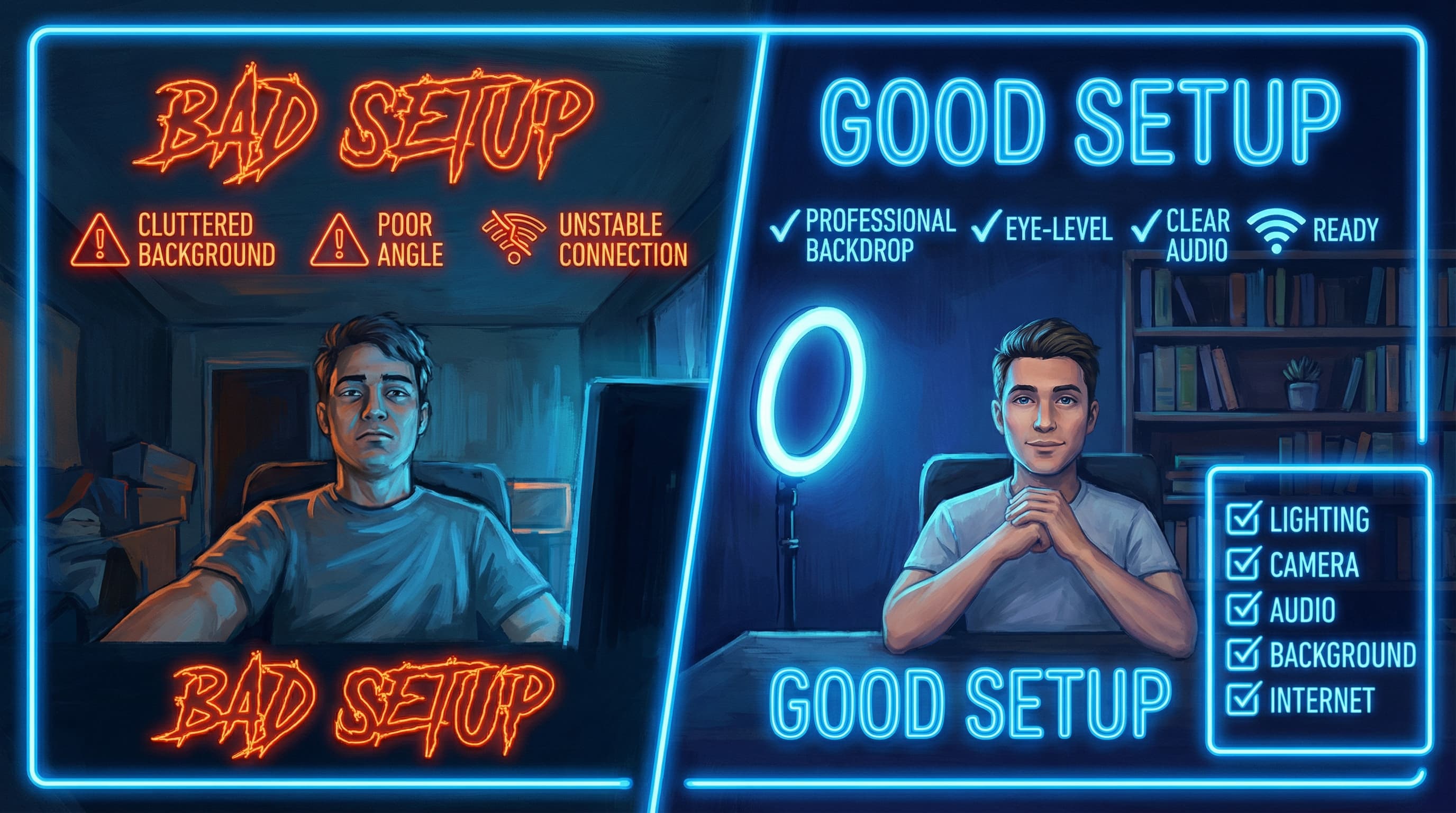
Hele 86 % av alle selskaper bruker nå videointervjuer som en del av sin ansettelsesprosess, men de fleste kandidater behandler fortsatt Zoom-samtaler som uformelle videochatter. Resultatet? Kvalifiserte fagfolk går glipp av drømmejobber på grunn av tekniske feil som kunne vært unngått, dårlig belysning som får dem til å se utslitte ut, eller kroppsspråk som ikke oversettes godt gjennom en skjerm.
Sannheten er at et Zoom-intervju er en forestilling – en der ditt tekniske oppsett, din fremtoning, din belysning og din adferd alt sammen kommuniserer profesjonalitet og beredskap før du i det hele tatt sier et ord. Denne omfattende guiden bryter ned de kritiske elementene du må mestre for å skille deg ut i ditt neste virtuelle intervju.
Raske gevinster: 5 ting du kan fikse på 5 minutter
Før vi går i dybden, her er umiddelbare forbedringer som utgjør en forskjell med en gang:
- Hev din bærbare datamaskin på en stabel med bøker slik at kameraet er i øyehøyde.
- Sitt mot et vindu i stedet for å ha det bak deg.
- Lukk alle faner i nettleseren og demp alle varsler.
- Legg telefonen i et helt annet rom.
- Ha på deg fullt intervjuantrekk, inkludert bukser eller skjørt.
La oss nå utforske hvert element i detalj.
Del 1: Teknisk oppsett – Grunnlaget for et vellykket videointervju
Før vi diskuterer fremtoning eller etikette, må teknologien fungere feilfritt. Tekniske feil skaper unødvendig stress og fjerner fokus fra dine kvalifikasjoner. Her er hvordan du eliminerer dem.
Hvilken enhet bør du bruke til et Zoom-intervju?
Ditt valg av enhet påvirker i stor grad hvordan du fremstår på kameraet. Stasjonære og bærbare datamaskiner presterer alltid bedre enn mobile enheter, så unngå å gjennomføre intervjuet fra en smarttelefon hvis mulig. Bærbare datamaskiner tilbyr bedre kamerakvalitet, mer pålitelig lyd og en mer stabil opplevelse enn telefoner.
Ta disse viktige forberedelsestiltakene før intervjuet:
- Installer og oppdater Zoom minst 24 timer før ditt planlagte intervju. Dette gir deg tid til å løse eventuelle installasjonsproblemer uten stress i siste liten. Sjekk systeminnstillingene dine og sørg for at Zoom er fullt oppdatert til den nyeste versjonen.
- Lad enheten din helt opp, og koble den til strøm under intervjuet. En bærbar datamaskin med lavt batterinivå kan krasje på et kritisk tidspunkt, så eliminer denne risikoen fullstendig.
- Test internettforbindelsen din grundig. Kjør en hastighetstest for å bekrefte at du har tilstrekkelig båndbredde (minimum 2,5 Mbps nedlasting/opplasting). En stabil, kablet forbindelse via Ethernet er å foretrekke fremfor Wi-Fi. Hvis du må bruke Wi-Fi, plasser deg nær ruteren din.
Hvordan bør jeg plassere kameraet mitt for et Zoom-intervju?
Kameraplasseringen påvirker direkte hvor selvsikker og profesjonell du fremstår. Gjør du dette feil, vil selv de beste svarene ikke nå frem.
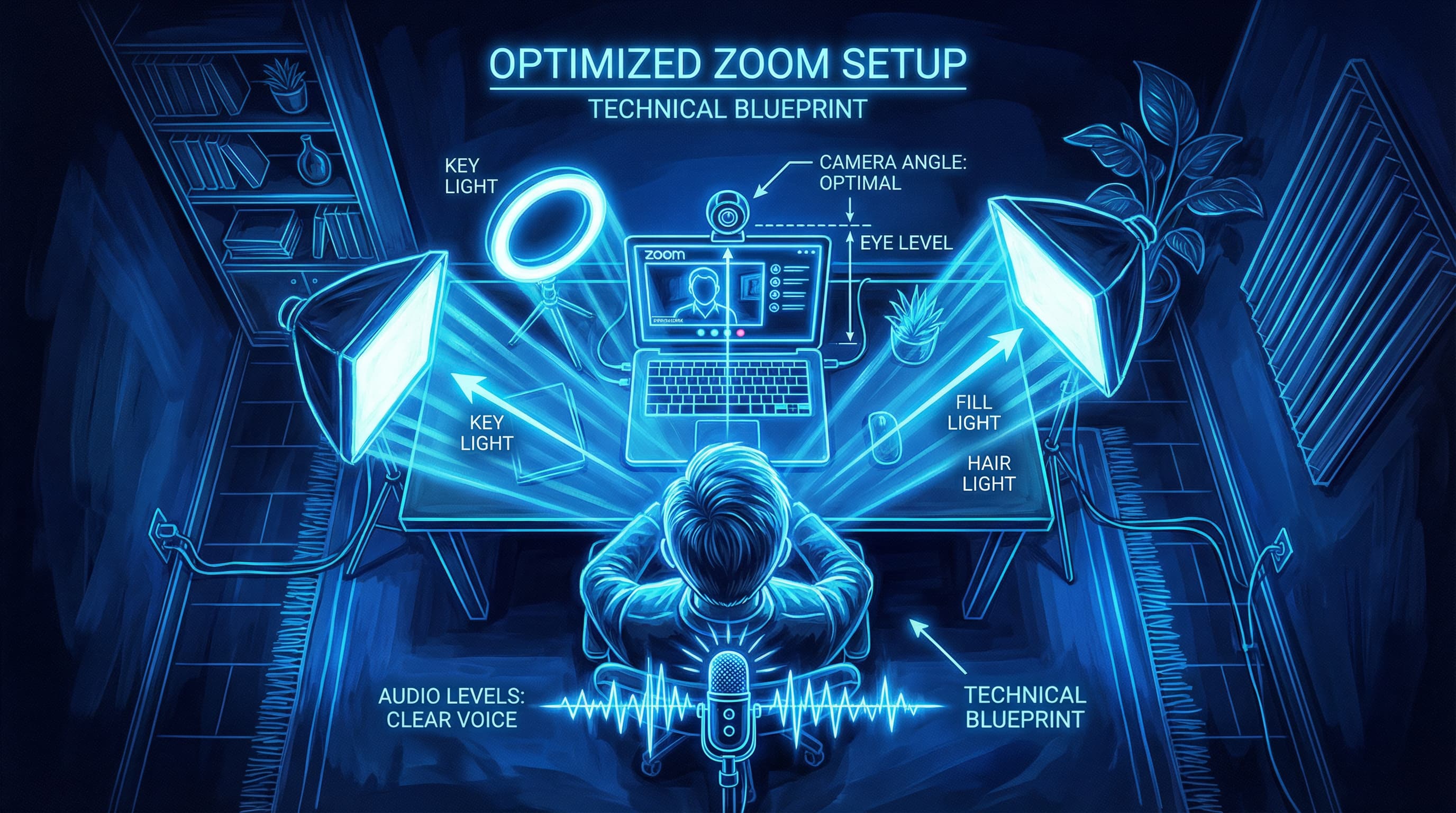
Plasser kameraet i eller litt over øyehøyde. Dette er ikke forhandlingsbart. Når kameraet sitter for lavt, ser det ut som om du ser ned på intervjueren, noe som kan virke nedlatende. For høyt, og du ser underdanig ut og ser konstant oppover. Plassering i øyehøyde etterligner en naturlig samtale ansikt til ansikt og skaper psykologisk kontakt.
I praksis:
- For bærbare datamaskiner: Stable bøker eller bruk et justerbart stativ under den bærbare datamaskinen for å flukte kameralinsen med øynene dine.
- For eksterne webkameraer: Plasser kameraet øverst på skjermen eller på et lite justerbart stativ.
- Avstand: Sitt omtrent 60 cm (to fot) unna kameraet, slik at hodet og skuldrene dine fyller ca. to tredjedeler av bilderammen.
Test dette oppsettet ved å ta opp deg selv på Zoom. Ansiktet ditt skal være sentrert med like mye plass over og til sidene av hodet. Unngå de uflatterende vinklene "opp i nesen" eller "se ned" som preger mange uforberedte kandidater.
Hvorfor lydkvalitet betyr mer enn video
Her er en hemmelighet de færreste kandidater kjenner til: lydkvalitet er ofte viktigere enn videokvalitet. Intervjuere kan tolerere en litt kornete video, men uklar eller dempet tale vil ødelegge intervjuet ditt umiddelbart.
Bruk en ekstern mikrofon i stedet for den bærbare datamaskinens innebygde mikrofon. Mikrofoner i bærbare datamaskiner fanger opp for mye bakgrunnsstøy og produserer dempet eller forvrengt lyd. Rimelige USB-mikrofoner som Blue Yeti eller Snowball tilbyr dramatisk bedre klarhet for under tusenlappen.
Når du setter opp mikrofonen:
- Avstand: Plasser den 15–20 cm fra munnen din.
- Karakteristikk: Snakk direkte inn i mikrofonen uten å blokkere den med hendene.
- Testing: Kjør et testopptak minst 30 minutter før intervjuet for å sjekke lydnivå og klarhet.
Hvis du ikke har en ekstern mikrofon, bruk kablede ørepropper med innebygd mikrofon – de vil fungere betydelig bedre enn den bærbare datamaskinens mikrofon.
Optimaliser lydinnstillingene dine i Zoom:
- Åpne Innstillinger > Lyd.
- Under "Mikrofon", bekreft at din eksterne mikrofon er valgt som inndataenhet.
- Juster inndatavolumet slik at det ligger på 75–80 % for å unngå forvrengning (clipping).
- Deaktiver ekkokansellering hvis du bruker lydutstyr av høy kvalitet; disse filtrene kan forstyrre mikrofoner i profesjonell kvalitet.
Krav til internettforbindelse for Zoom-intervjuer
Test internetthastigheten din minst 24 timer før intervjuet. Zoom-videoanrop krever:
- Minimum: 2,5 Mbps nedlasting, 1,5 Mbps opplasting.
- Anbefalt: 5+ Mbps for pålitelig video uten buffering.
Gjennomfør en test-Zoom-samtale med en venn eller et familiemedlem for å identifisere eventuelle tilkoblingsproblemer. Hvis Wi-Fi-forbindelsen er ustabil, bør du vurdere å bruke en Ethernet-kabel for en mer pålitelig tilkobling. Et frosset videobilde eller hakkete lyd signaliserer manglende profesjonalitet – selv om det ikke er din feil, kan intervjuere underbevisst holde det mot deg.
Viktige Zoom-innstillinger å konfigurere
- Oppdater Zoom: Installer den nyeste versjonen av appen. Foreldede versjoner har feil og sikkerhetshull.
- Opprett et testmøte: Delta i et øve-Zoom-møte 30 minutter før intervjuet for å sjekke lyd, video og alle innstillinger.
- Fullskjermsmodus: Sett Zoom til full skjerm under selve intervjuet slik at intervjueren er det eneste du kan se. Dette forhindrer fristelsen til å se på andre vinduer.
- Varsler: Deaktiver alle varsler på datamaskinen din. Lukk e-post, Slack, sosiale medier og alle programmer som kan distrahere deg eller gi lyder.
Del 2: Belysning – Den visuelle fordelen som skiller deg ut
Belysning er det mest undervurderede elementet i videointervjuer. Dårlig belysning får deg til å se trøtt, uprofesjonell eller uengasjert ut, selv om du ikke er det. Profesjonell belysning transformerer din fremtoning og fanger oppmerksomheten. Den gode nyheten? Du trenger ikke dyrt utstyr for å gjøre det riktig.
Grunnleggende om belysning som enhver kandidat bør kjenne til
Forståelse av de grunnleggende prinsippene for belysning hjelper deg med å ta informerte beslutninger om oppsettet ditt:
- Lysintensitet: Sikt på en primær belysning i området 600 til 800 lumen for å tydelig vise ansiktet ditt uten harde skygger.
- Fargetemperatur: Sikt på nøytralt hvitt lys i området 4000K til 5500K. For varmt lys (under 3000K) får deg til å se trøtt ut; for kaldt lys (over 6000K) ser hardt og klinisk ut. Dagslys er rundt 5000K – det ideelle referansepunktet.
- Lysretning: Lyset skal komme forfra, ikke bakfra. Motlys skaper en silhuett-effekt som mørklegger ansiktet ditt og gjør deg nesten ugjenkjennelig.
Bør jeg bruke naturlig eller kunstig lys?
Prioriter naturlig lys når det er mulig. Plasser deg mot et stort vindu med mykt, diffust dagslys. Unngå direkte sollys, som skaper harde skygger og ujevne hudtoner. Hvis et vindu ikke er tilgjengelig, eller lyset er for direkte, trekk for tynne gardiner for å spre lyset.
Overskyede dager er faktisk perfekte for videointervjuer – skyene fungerer som en gigantisk diffuser som mykgjør lyset og fordeler det jevnt over ansiktet ditt. Hvis intervjuet er på en solskinnsdag, vurder når lyset vil være best i ditt valgte rom.
Når det naturlige lyset ikke er tilstrekkelig, kan du investere i LED-paneler eller softbox-lys designet for video. Moderne LED-lys er rimelige (starter rundt 300 kr), kjølige å berøre og tilbyr variable fargetemperaturer.
Trepunktsbelysning (profesjonell tilnærming)
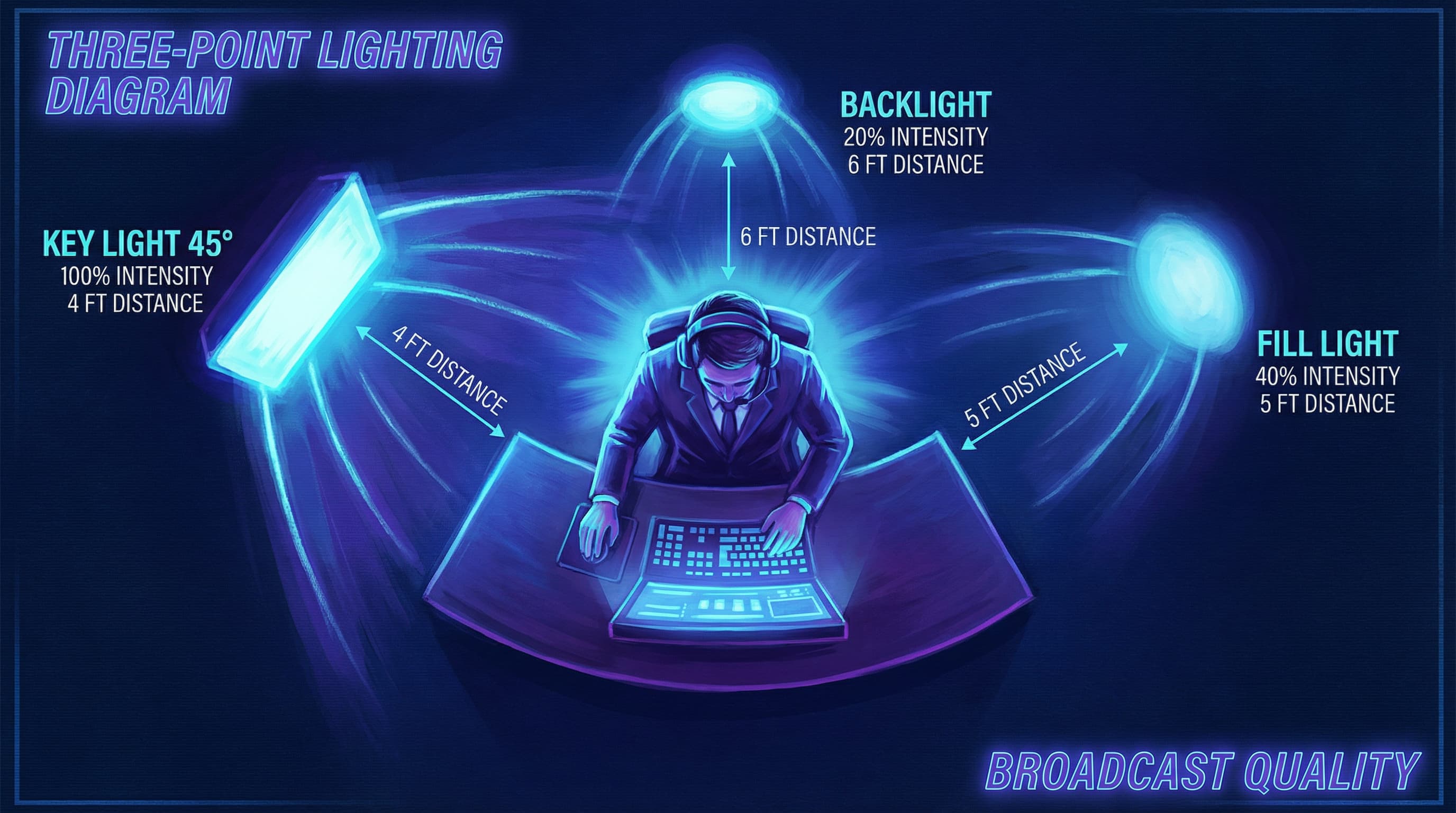
Hvis du har tilgang til belysningsutstyr, er trepunktsbelysning den profesjonelle standarden. Det er den samme teknikken som brukes av nyhetsankere og innholdsskapere:
1. Key Light (Hovedlys)
- Plasseres i en 45-graders vinkel til siden av ansiktet ditt, litt over øyehøyde.
- Bruk den klareste og største lyskilden tilgjengelig (et LED-panel eller en softbox).
- Avstand: 60–90 cm fra ansiktet ditt for myk, jevn dekning.
- Formål: Lyser opp ansiktet ditt og skaper dimensjon.
2. Fill Light (Utfyllingslys)
- Plasseres på motsatt side av ansiktet med en intensitet som er 50 % lavere enn hovedlyset.
- Kan være en reflektor (som kaster lyset fra hovedlyset tilbake) eller et sekundært LED-lys.
- Formål: Eliminerer harde skygger under haken og øynene, noe som forhindrer et altfor dramatisk utseende.
3. Backlight (Skillelys)
- Plasseres bak deg i en 30–45 graders vinkel, med ca. halvparten av lysstyrken til hovedlyset.
- Skaper en subtil halo-effekt som skiller deg fra bakgrunnen.
- Formål: Legger til dybde og forhindrer at du smelter sammen med bakgrunnen.
Budsjettvennlige belysningsløsninger
Har du ikke profesjonelt belysningsutstyr? Ikke noe problem. Her er effektive alternativer:
- Skrivebordslampe-hack: Bruk en skrivebordslampe med en myk hvit pære plassert i en 45-graders vinkel mot ansiktet ditt.
- Vindusplassering: Plasser deg mot et vindu med naturlig lys som treffer ansiktet ditt direkte.
- DIY-reflektor: Bruk hvit papp eller skumplate som reflektor for å kaste lys over på den mørke siden av ansiktet ditt.
- Ring lights: Rimelige ring lights (under 300 kr) gir en jevn, flatterende belysning og er spesifikt designet for videoanrop.
- Unngå kun taklys: De skaper uflatterende skygger under øynene dine som får deg til å se trøtt ut.
Belysning: Do's and Don'ts
| Do | Don't |
|---|---|
| Plasser lyskilder foran deg for å eliminere skygger | Bruk ikke bare direkte takbelysning (skaper harde skygger under øynene) |
| Bruk diffust, mykt lys i stedet for hardt, direkte lys | Sitt ikke med et skarpt lys direkte bak deg (gir silhuett-effekt) |
| Test belysningen gjennom kameraskjermen, ikke bare med øynene | Stol ikke bare på kunstig lys uten å teste det på kameraet |
| Still inn lysets fargetemperatur til 4000K–5500K for dagslyskonsistens | Bland ikke varme (2700K) og kalde (5600K) lyskilder (gir fargeubalanse) |
| Hold lysene på avstand og i en vinkel for å unngå å knipe øynene sammen | Lys ikke direkte inn i ansiktet ditt eller for nær øynene dine |
Del 3: Bakgrunn og miljø
Bakgrunnen din kommuniserer like mye som ordene dine. En rotete eller uprofesjonell bakgrunn fjerner fokus fra dine kvalifikasjoner og antyder skjødesløshet. Her er hvordan du skaper et rom som styrker din troverdighet.
Hva gjør en intervjubakgrunn ideell?
- Ren og ryddig: Velg en ensfarget vegg, en pen bokhylle eller et enkelt hjemmekontor-oppsett.
- Profesjonell estetikk: Unngå forstyrrende mønstre, personlige bilder eller gjenstander som ikke er relevante for din rolle.
- Nøytrale farger: Eggehvit, grå og blå toner gir et profesjonelt lerret som ikke distraherer.
- Dybde og interesse: En enkel bokhylle eller plante kan legge til subtil visuell interesse uten kaos.
- Ingen bevegelse: Sørg for at ingenting i bakgrunnen vil bevege seg, flagre eller distrahere under intervjuet.
Virtuelle bakgrunner vs. fysiske bakgrunner: Hva er best?
Virtuelle bakgrunner (Zooms uskarphet eller digitale scener) kan fungere, men de er risikable. Her er hvorfor:
- De bruker datakraft, noe som potensielt kan føre til hakking eller forsinkelse i videoen.
- Dårlig utførte virtuelle bakgrunner ser uprofesjonelle ut og kan "klippe" piksler rundt kroppen din.
- Enkle uskarphetseffekter (blur) er tryggere enn avanserte digitale scener.
Beste praksis: Hvis du har en presentabel fysisk bakgrunn, bruk den. Hvis ikke, bruk Zooms uskarphetsfunksjon fremfor en distraherende digital bakgrunn. Test enhver virtuell bakgrunn under en øvesamtale for å sikre at den vises riktig på din spesifikke datamaskin.
Praktiske tips for bakgrunnsoppsett
- Plasser skrivebordet eller stolen din slik at bakgrunnen fyller rommet bak deg uten å se trang ut.
- Sørg for tilstrekkelig plass rundt hodet for å opprettholde riktig framing.
- Test bakgrunnen din ved å delta i et øve-Zoom-møte og gjennomgå hvordan den ser ut på kameraet.
- Hvis mulig, velg en plassering unna dører, vinduer med bevegelse eller ganger der familiemedlemmer kan gå forbi.
Del 4: Hva skal man ha på seg til et videointervju?
Klærne dine setter forventningene og signaliserer respekt for muligheten. Det finnes ikke noe som heter å være "overdressed" til et intervju, men det finnes noe som heter å være "underdressed".
Den generelle regelen: Kle deg ett nivå over selskapets norm
Undersøk selskapet på deres nettside, LinkedIn og medarbeiderbilder. Hvis teamet deres bruker business casual, løft det til business professional. Hvis de er mer formelle (jus, finans, rådgivning), bruk fullt formelt forretningsantrekk.
Business Formal (Tradisjonelle bransjer)
For menn: Mørk dressjakke eller blazer med skjorte, slips og pussede sko. For kvinner: Skreddersydd dress eller profesjonell bluse med en blazer, dressbukse eller skjørt, og lukkede sko.
Bransjer som typisk forventer formelt antrekk: jus, finans, revisjon, offentlig administrasjon og ledende stillinger i næringslivet.
Business Casual (Mest vanlig)
For menn: Skjorte med krage i nøytrale toner (hvit, lyseblå, grå), eventuelt med en blazer eller genser. Kombiner med dressbukse eller chinos. For kvinner: Bluse, skjorte eller en pen genser i nøytrale toner, kombinert med dressbukse, et skjørt eller en profesjonell kjole. Legg til en blazer for et polert uttrykk.
Business Casual Plus (Kreative og tekniske bransjer)
Velsittende jeans kombinert med en pen skjorte eller en strukturert overdel er akseptabelt i mer avslappede miljøer. Unngå imidlertid grafiske t-skjorter, hettegensere eller noe for uformelt.
Hvilke farger og mønstre fungerer best på kamera?
| Element | Veiledning |
|---|---|
| Fargevalg | Hold deg til nøytrale farger (marineblå, grå, hvit, beige, svart). De ser profesjonelle ut og distraherer ikke på kameraet. Ensfargede blåtoner gjør seg spesielt godt på video. |
| Mønstre | Unngå travle, distraherende mønstre. Subtile teksturer og ensfargede farger gjør seg bedre. Små striper kan forårsake en distraherende "moiré"-effekt på kameraet. |
| Passform | Bruk klær som sitter godt og som får deg til å føle deg selvsikker, ikke selvbevisst eller begrenset. |
| Nederste halvdel | Bruk alltid profesjonelle bukser eller skjørt, selv om bare den øverste halvdelen din er synlig. Dette beskytter deg hvis du må reise deg opp, og det setter deg i en profesjonell tankegang. |
| Smykker og tilbehør | Hold dem minimale og profesjonelle. Unngå alt som klirrer, klikker eller distraherer når du beveger deg. |
| Personlig pleie | Sørg for personlig pleie om morgenen før intervjuet. Pent hår, lett sminke (hvis du bruker det) og et velstelt ytre betyr noe. |
| Grafiske t-skjorter | Unngå enhver skjorte med politiske, splittende eller altfor uformelle budskap. Hold fokus på dine kvalifikasjoner. |
Del 5: Mestre Zoom-etikette
Teknisk ekspertise og fremtoning betyr ingenting hvis adferden din distraherer eller fornærmer intervjueren din. Virtuelle intervjuer krever bevisste kommunikasjonsjusteringer som ikke faller de fleste naturlig.
Før intervjuet begynner
Kom tidlig: Delta i Zoom-møtet 5–10 minutter før det planlagte starttidspunktet. Dette gir deg tid til å sjekke lyd- og videoinnstillingene dine og roe nervene. Men delta ikke mer enn 10 minutter før – det kan overrumple intervjuerne.
Demp alt: Slå av telefonen, lukk alle varsler på datamaskinen og demp alle husholdningsapparater. Legg telefonen helt ute av syne – forskning viser at bare det å se en telefon reduserer den kognitive ytelsen og sprer oppmerksomheten.
Forbered rommet ditt: Lukk unødvendige faner i nettleseren, demp e-postprogrammet ditt og sørg for at ingen andre er i rommet som kan avbryte deg. Lås døren hvis mulig, og informer bofeller eller familiemedlemmer om intervjutiden din.
Ha materiell klart: Plasser CV-en din, søknaden og forberedelsesnotatene dine innen rekkevidde, men utenfor bilderammen. Ha selskapets nettside og stillingsbeskrivelsen tilgjengelig på en sekundær skjerm eller printet i nærheten for rask referanse.
Under intervjuet: Kroppsspråk og øyekontakt
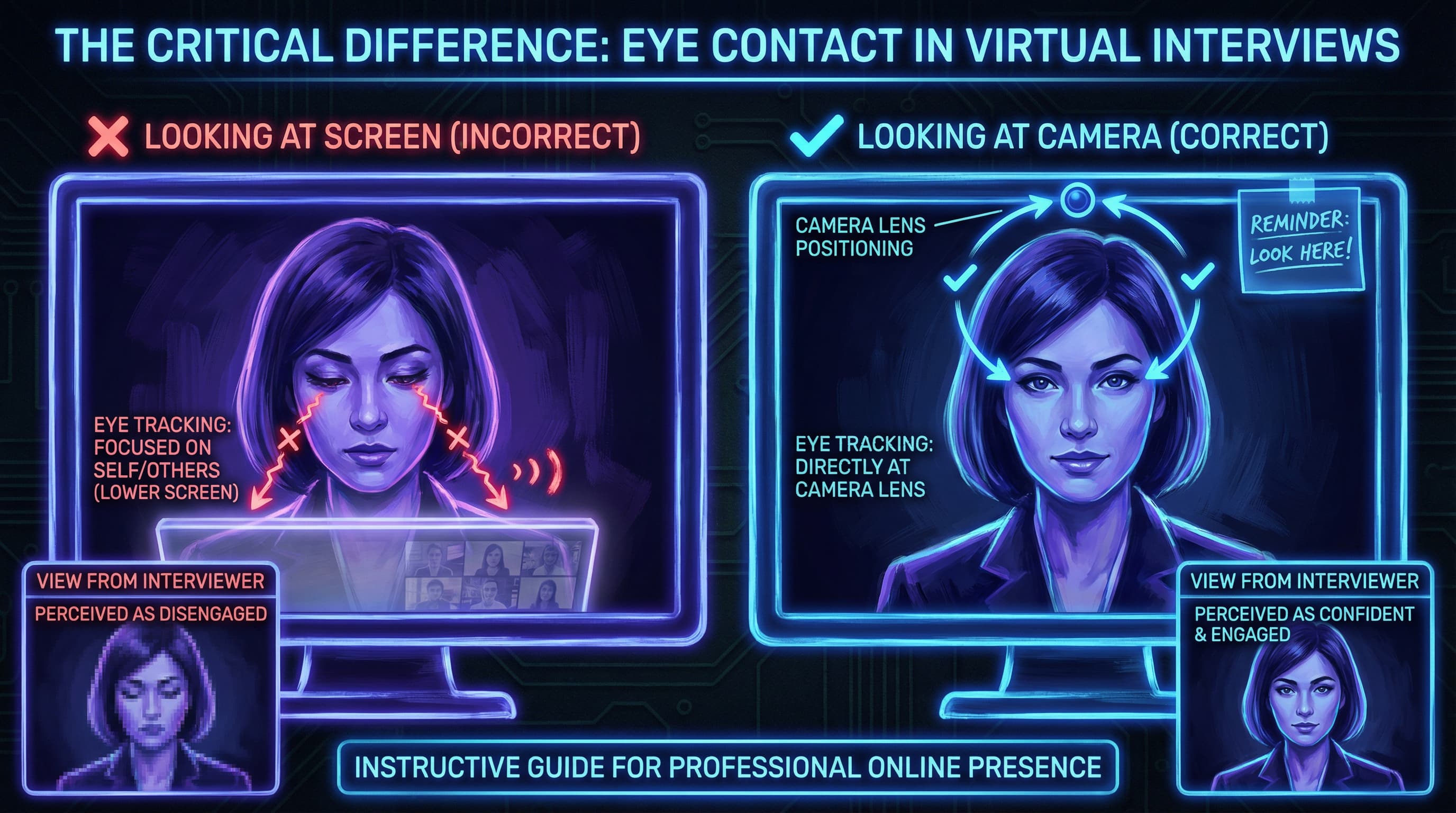
Hold øyekontakt med kameraet: Dette er det viktigste adferdsmessige elementet. I stedet for å se på intervjuerens ansikt på skjermen, se direkte inn i kameralinsen. Dette skaper en illusjon av øyekontakt og bygger tillit. Det føles unaturlig i starten, men øvelse gjør det naturlig.
Pro-tips: Plasser et lite bilde eller en post-it nær kameralinsen som fokuspunkt. Når du ser på den, vil du naturlig skape "øyekontakt" med intervjueren.
Kontroller kroppsspråket ditt:
- Sitt rett opp med skuldrene tilbake. Å sitte sammensunket kommuniserer manglende interesse og lav energi.
- Læn deg litt fremover i viktige øyeblikk for å signalisere engasjement og interesse.
- Hold hendene dine synlige og bruk målrettede bevegelser innenfor kamerarammen. Bevegelser gir effekt, men skru litt ned på dem – bevegelser som er normale ansikt til ansikt, virker overdrevne på kameraet.
- Unngå å fikle med ting, krysse armene eller berøre ansiktet ditt gjentatte ganger.
Nikk og bekreft: Nikk av og til for å vise at du lytter og bearbeider intervjuerens ord. Dette kompenserer for de små lydforsinkelsene som er forbundet med videosamtaler, og viser at du er aktivt engasjert.
Kontroller ansiktsuttrykkene dine:
- Unngå det "nøytrale Zoom-ansiktet" – det tomme blikket som får deg til å se uinteressert eller engstelig ut.
- Smil når det er passende og ekte.
- Forsterk uttrykkene dine med 10–15 % sammenlignet med samtaler ansikt til ansikt; kameraet demper subtile tegn.
- Øv deg foran et speil eller ta opp deg selv for å se hvordan uttrykkene dine oversettes på kameraet.
Slik snakker du effektivt i et videointervju
Snakk med hensikt:
- Varier tonen og tempoet: Bytt betoning når du fremhever viktige punkter. Sett tempoet ned når du kommer med viktige utsagn. Snakk litt høyere og i et moderat tempo – det holder energien din skarp og engasjerende.
- Hold en pause før du besvarer komplekse spørsmål: Stillhet viser at du faktisk vurderer svaret ditt, og ikke bare slynger ut det første som faller deg inn. Det forhindrer også ustrukturert tale.
- Hold svarene korte: Sikt på 30–60 sekunder per svar, med mindre spørsmålet krever en dypere forklaring. Langstrakte svar dreper engasjementet i virtuelle omgivelser der oppmerksomhetsspennet er kortere. (For hjelp til å strukturere svarene dine, sjekk vår guide til de 30 vanligste intervjuspørsmålene).
- Oppsummer og bekreft: Når intervjueren har forklart et komplekst emne, parafraser kort din forståelse. Dette viser aktiv lytting og forhindrer misforståelser.
Administrer Zoom-funksjoner strategisk:
- Kjenn mute-knappen din: Bruk mellomromstasten til å raskt slå lyd på/av. Demp deg selv mens intervjueren snakker for å eliminere bakgrunnsstøy, men slå lyden på raskt når du svarer.
- Notatskriving: Hvis du trenger å ta notater, be om lov først. Penn og papir er alltid bedre enn å taste (som er hørbart og distraherende).
- Forstå skjermdeling: Hvis du skal presentere en portefølje eller arbeidseksempler, øv på skjermdeling på forhånd. Vit hvordan du starter og stopper deling på en elegant måte. Lukk alle personlige faner eller dokumenter før deling.
Vanlige Zoom-intervjufeil du bør unngå
| Feil | Hvorfor det betyr noe | Løsning |
|---|---|---|
| Se på deg selv i stedet for kameraet | Virker uinteressert og bryter illusjonen om øyekontakt | Minimer ditt eget bilde i Zoom; fokuser på kameralinsen |
| Hørbar tastelyd ved notatskriving | Skaper distraherende bakgrunnsstøy | Bruk penn og papir i stedet, eller spør før du taster |
| Sjekke telefonen din | Signalerer manglende respekt og sprer oppmerksomheten din | Legg telefonen helt ute av syne |
| Snakke for fort | Høres nervøst ut og gjør deg vanskeligere å følge | Sett ned tempoet med vilje, hold pauser mellom tanker |
| Ustrukturert tale eller for lange svar | Gjør at intervjuerens oppmerksomhet svekkes | Forbered strukturerte svar; sikt på 30–60 sekunder |
| Dårlig holdning eller sammensunket stil | Kommuniserer lav energi og manglende selvtillit | Sitt rett opp med skuldrene tilbake; len deg litt frem |
| Overdrevne håndbevegelser | Virker nervøst eller distraherende på kameraet | Hold bevegelser synlige, men kontrollerte |
| Avbryte eller snakke over intervjueren | Viser dårlige lytteferdigheter og utålmodighet | Vent til de er ferdige; lydforsinkelser krever tilbakeholdenhet |
Slik håndterer du tekniske problemer under intervjuet ditt
Tekniske problemer oppstår, selv med den beste forberedelsen. Hvordan du håndterer dem, avslører din profesjonalitet og ro under press.
Hvis videoen fryser eller lyden faller ut:
- Forbli rolig – få ikke panikk og vis ikke frustrasjon.
- Si rolig: "Jeg opplever et teknisk problem. La meg prøve å løse det."
- Slå av kameraet og slå det på igjen, eller forlat møtet og delta på nytt.
- Hvis problemet fortsetter, foreslå å bytte til en telefonsamtale som backup.
Hvis intervjuerens forbindelse er dårlig:
- Nevn det høflig: "Jeg har problemer med å høre deg tydelig. Vil du gjenta det?"
- Ikke lat som om du forstod det når du ikke gjorde det – misforståelser er verre enn korte tekniske pauser.
Ha en backup-plan:
- Hold telefonen din ladet og i nærheten (lydløs) som backup til å delta via mobil.
- Ha intervjuerens telefonnummer eller e-post tilgjengelig hvis du får behov for å kontakte dem utenfor Zoom.
Etter intervjuet
Send en takke-e-post innen 24 timer. Nevn noe spesifikt fra samtalen deres som forsterket din interesse for rollen. En gjennomtenkt oppfølging skiller deg ut i konkurransepregede prosesser og holder deg i minnet.
Eksempel på rammeverk:
- Åpne med takknemlighet
- Henvis til et spesifikt samtaleemne eller spørsmål
- Gjenta din interesse for rollen og selskapet
- Avslutt profesjonelt
Del 6: Den ultimate Zoom-intervju forberedelses-sjekklisten
Bruk denne tidsplanen for å sikre at du er fullt forberedt.
En uke før:
- Undersøk selskapet, rollen og intervjuerne
- Øv på å besvare vanlige spørsmål (se vår guide til 30 intervjuspørsmål)
- Test internettforbindelsen og enheten din
- Identifiser og forbered intervjustedet ditt
To dager før:
- Oppdater Zoom til den nyeste versjonen
- Test kamera, mikrofon og belysning
- Gjennomfør et øveintervju med en venn
- Planlegg ditt fulle antrekk (inkludert bukser/skjørt!)
- Test bakgrunnen din på kameraet
Dagen før:
- Bekreft tid, dato og tidssone
- Forbered rommet ditt (ren bakgrunn, oppsatt belysning)
- Lad enheten din helt opp
- Print CV og notater eller ha dem klare på en sekundær skjerm
- Få nok søvn
60 minutter før:
- Sørg for personlig pleie
- Ta på deg ditt fulle intervjuantrekk
- Spis et lett måltid og hold deg hydrert
- Gå gjennom notatene dine og de viktigste fokuspunktene
10 minutter før:
- Logg inn på Zoom og test lyd/video en siste gang
- Lukk unødvendige faner og programmer
- Lydløs telefonen din og legg den ute av syne
- Ta dype åndedrag, smil og finn fokus
Ofte stilte spørsmål om Zoom-intervjuer
Hvor tidlig bør jeg delta i et Zoom-intervju?
Delta 5–10 minutter før det planlagte starttidspunktet. Dette gir deg tid til å sjekke innstillingene dine uten å virke for ivrig. Delta ikke mer enn 10 minutter før, da det kan overrumple intervjuerne.
Bør jeg bruke Zooms bakgrunnsuskarphet?
Bruk uskarphet bare hvis den fysiske bakgrunnen din er rotete eller uprofesjonell. En ren fysisk bakgrunn er alltid å foretrekke fordi uskarphetseffekter kan svikte og bruker datakraft. Test enhver bakgrunnseffekt under en øvesamtale først.
Hva om jeg har tekniske problemer under intervjuet?
Forbli rolig og profesjonell. Anerkjenn problemet ("Jeg opplever en teknisk utfordring"), forsøk å løse det, og ha backup-planer klare (delta via telefon, bytt til kun lyd). Hvordan du håndterer problemer, viser din profesjonalitet.
Kan jeg bruke notater under et Zoom-intervju?
Ja, men diskré. Ha notater i nærheten, men utenfor bilderammen, og ikke les dem opp ord for ord. Kortvarige kikk er akseptable, men fokuset ditt skal forbli på kameraet. Hvis du trenger å henvise til noe spesifikt, er det greit å si: "La meg sjekke notatene mine om det."
Hva er den beste belysningen for et Zoom-intervju?
Vend deg mot et vindu med naturlig lys, eller bruk kunstig lys plassert foran deg i en 45-graders vinkel. Unngå takbelysning og sitt aldri med et vindu eller skarpt lys bak deg. Sikt mot 600–800 lumen og en fargetemperatur på 4000K–5500K.
Bør jeg se på kameraet eller skjermen?
Se inn i kameralinsen når du snakker for å skape illusjonen om øyekontakt. Du kan se på skjermen mens du lytter, men tving deg selv til å vende blikket tilbake mot kameraet når du svarer.
Avsluttende tanker
Å lykkes med et Zoom-intervju handler om mestring på flere nivåer: teknisk overskudd, profesjonell fremtoning, bevisst kommunikasjon og autentisk engasjement. Kandidater som lykkes, behandler Zoom-oppsettet sitt som et profesjonelt TV-studio, ikke som en uformell videosamtale. De forstår at belysning, kameravinkel og bakgrunnsdesign ikke er forfengelighet – det er verktøy som kommuniserer kompetanse og respekt.
Det viktigste elementet er ikke perfeksjon; det er forberedelse. Ved systematisk å adressere teknisk oppsett, belysning, bakgrunn, fremtoning og adferd fjerner du hindringer som kan distrahere fra dine kvalifikasjoner. Dette lar din erfaring, dine ferdigheter og din personlighet skinne gjennom ufiltrert. Intervjuet blir en samtale fremfor en forestilling – og det er her du vinner muligheten.
Utover ditt tekniske oppsett er innholdet i svarene dine det som virkelig sikrer jobben. Hvis du har lyst til å øve deg i et realistisk miljø uten for mye press, prøv vår intervju-assistent på CareerBoom AI. Den simulerer virkelige intervjuscenarier, gir personlig tilbakemelding og hjelper deg med å finpudse svarene dine inntil du er selvsikker og klar.
Husk: Intervjuerne håper du lykkes. De har allerede screenet CV-en din og identifisert deg som en kvalifisert kandidat. Oppgaven din i intervjuet er bare å bekrefte at beslutningen deres var riktig. En polert Zoom-opptreden gjør den bekreftelsen lett. Nå som du er klar til å lykkes med intervjuet, kan du starte søket etter den perfekte rollen ved å utforske vår kuraterte liste over de 21 beste nettsidene for fjernarbeid.
Var denne artikkelen nyttig?
Innholdsfortegnelse
Raske gevinster: 5 ting du kan fikse på 5 minutter
Del 1: Teknisk oppsett – Grunnlaget for et vellykket videointervju
Del 2: Belysning – Den visuelle fordelen som skiller deg ut
Del 3: Bakgrunn og miljø
Del 4: Hva skal man ha på seg til et videointervju?
Del 5: Mestre Zoom-etikette
Del 6: Den ultimate Zoom-intervju forberedelses-sjekklisten
Ofte stilte spørsmål om Zoom-intervjuer
Avsluttende tanker
Del denne artikkelen
Andre artikler
Topp 30 vanligste jobbintervjuspørsmål og de beste svarene
Mestre ditt neste intervju med denne omfattende guiden til de vanligste spørsmålene og hvordan du svarer effektivt på dem.

20 «killer-spørsmål» du bør stille på slutten av et intervju
Snu bordet og imponer ansettelsesansvarlige med strategiske spørsmål som demonstrerer din verdi og avslutter sterkt.
21 Beste nettsteder for fjernarbeid i 2026
Oppdag verifiserte plattformer fra CareerBoom.AI til LinkedIn for å finne godt betalte fjernkarrierer.